Lights

I been using this and the former program for a few years and have always used the default lights in 3d when modeling and most times being frustrated with the view at what is actually happening on the surface if I am using the sculpting tools or other functions.
I know there are settings to change the light source and was wondering if anyone has some advise for settings they have found helpful.
Bill
Comments
Bill,
I love to spend time sculpting, its rather relaxing, used to get frustrated until I found I can see better with BRUSHED GOLD as the reflection map, the shininess I have about 100.
Using this you can see undulations, or imperfections faster, you get to see mismatches better, all around it's easier on the head, but like me you will have to start paying attention to size differences, because the settings I use show very small and you sort of have to remember in wood you need a minimum of .03 of an inch difference to show after the cutting.
You know what I would love is to be able to see the sculpting shadow in the 2d view, don't need it often but when I do I need it.
have a good weekend bro.
mike
Thanks
That made a difference. What do you mean by show very small in the settings.
Bill
I work with wood, I have to pay attention to differences and make them large enough to be seen, and so I don't sand them away, other wise all the time I spent working on the model is unpaid doodling, very frustrating because sometimes I can't fix it.
mike
Hi Mike
In your post you mentioned ( show very small in settings ) is this a settings choice or did I misunderstand.
Also I don't have brushed gold in my materials list I have satin gold 9 kt and 24 kt, is the shininess selection for the material selection or the sculpting selection in materials and light box
Bill
Bill,
I was making reference to the settings, or differences you will have when you combine 2 or more parts, or areas when you model, like I said I work with wood, if I do not pay attention to the differences my model will look like a blob, defining marks have to be seen, like when you model a flower as a wood worker I have to make sure the petals are at least .030" different in height so they don't run together, like my English writing skills (they suck, my sentences have a habit of running together). when I sculpt I have to pay attention to this, with settings I use in the lights it shows mis-marks very clear so clear in fact I have to make sure its what I want so I have to make sure the differences are at least .030" if I want them, or wipe them out.
here's a pic of my setting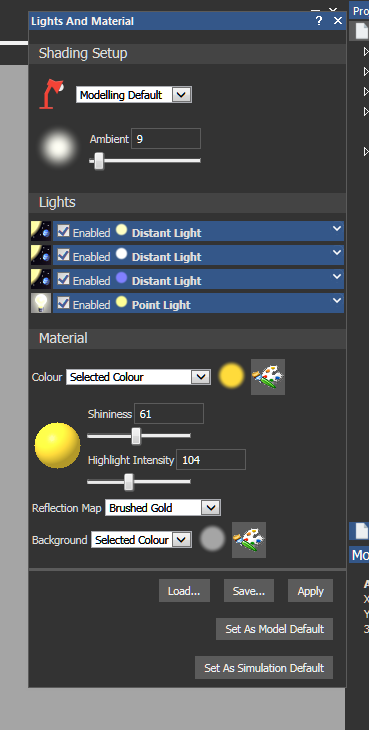
Please sign in to leave a comment.