Answered
create wavy V carve effect

Hi Group
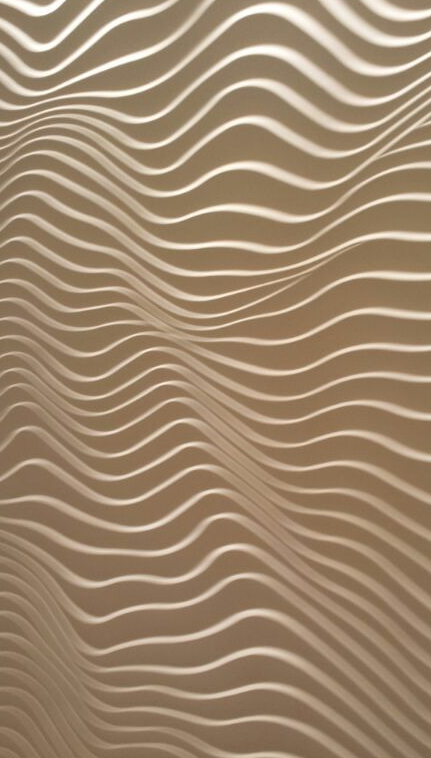
how do i create wavy V carve effects like this image in carveco?
Hi Group
how do i create wavy V carve effects like this image in carveco?
Comments
Looks as though you would need to use 2 rail sweep to get the waves, then use the angled plane tool to get the ridges. at least that's what I would use, then again you didn't give much to view. things like this are not that hard to do. just get the undulations first then go to work on the steps, on an other layer, then when you get your steps merge your layers to geather using add.
mike
Hi Mike
thankyou for your reply, i will have a try to see if i can replicate that...
although i was hoping it could be done with a simple V carve tool, which would make machining simple and quick as opposed to full surface machining.
Since you want to V-carve all you need to do is vectorize it and run a v-carve toolpath.
don't forget for v-carve you will need to close your vectors and in this case continue the vectors outside the required size to get a clean cut edge line. Then I would use a large v-bit such as a 1-1/2" to 2" 120° or 140°
Gary
Wow, forgot all about this (never used it) Thanks Gary
By the way Adrian Thank you for responding, I love to model, I take photos from and of anything just so I can model and get some more files ;) , have so many files, and am so involved with making models I forget everything else, even my kids, they get so irritated at me sometimes because I forget the phone, I forget birthdays, don't watch football (sports in general suck, people get so heated over what some young millionaire does or doesn't do) I get zoned in my own little world and I love it.
Have a wonderful day of giving thanks.
mike
To get the cool wavy distorted lines, first draw a series of straight horizontal lines, then use the Distortion tool on the whole lot and push and pull from the top and bottom to force the wave.
Jen
Hi thankyou for your replies, is there a way to use use a champher tool to run along a vector with the Z undulating between a minimum and maxim z depth along the line?
I realise i could possibly use a drive curve for the Z movement in some way but it would be good if the Z depth could be undulated between some set limits?
Hi Jen - I played with your suggestion of lines and the distortion tool and it was great for creating the wave pattern. However, I'm not sure how you would create the tool paths from there. Vcarve seems the obvious choice but you have a series of open vectors so that won't work. I thought I may be able to close the ends of all the vectors but it seems you can't share vectors as sides to an area you want to carve and you get a warning that all vectors are open. Would the solution be to duplicate all the vectors and shift them a few thou. to create a thin ridge between the vcarve paths by closing the offsets to the vector above or below it (depending on which way you did the offset)?
Thanks
Great question Adrian!
Try the profile toolpath. or check out this video https://www.youtube.com/watch?v=YoulyibWKqo&feature=emb_rel_pause talks of the fluting toolpath. or to this video
https://www.youtube.com/watch?v=NPkedS9EqP8
mike
Please sign in to leave a comment.