Preview Feature: History

In the Carveco 1.10 release, we've added a Preview Features section to the start page. There, you can turn on features that are in-development to provide early feedback to help us improve them.
The first preview feature we have made available is the History pane, which allows you to see the Undo history and quickly move through it. Once enabled, a History tab will appear on the right hand side when a model or project is open. Expanding this pane shows a list of the Undo and Redo steps for your current session. Clicking on one will take you backwards or forwards to that operation.
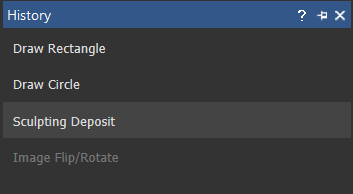
Please let us know if you find this feature useful, if you have any suggestions for how we can improve it, or if you encounter any bugs while using it.
Initially, we hope to make this feature more usable by making some wider improvements to Undo, such as fixing tools where Undo doesn't work correctly, and ensuring Undo state descriptions match the tool that created them.
Comments
Has anyone tested this yet? If so what do you think of it (I have not tested it, too busy this time of year).
Thanks
My assumption is you need to activate the history feature, and only history after that point will be tracked. Have not done any new work since I upgraded to that version.
Barry,
I enjoy to test all the tooling I have, and I have given it a spin.
As far as I have seen, it's not bad you definitely can go back a lot with one click, sometimes further than you intended (sort of goofed on using it twice, it does allow you to go back though) In my thought, this is something I would have never desired but I do see a lot of benefits though I would have preferred an addition to the angled plane tool to include giving a round shape with 4 to 6 points which would be so cool (just my view point), without making a new layer using either the 2 rail sweep or the shape editor. since I enjoy to model and don't do too many mistakes and have learned how to correct them quickly,
I will use it, but here it will take me some time to put it into use, like when we first got layers, took me a couple years to use them, now I don't know how I could ever have done anything without layers.
mike
Thanks Mike, glad to hear it works as described. I will have to give it a try after X-Mass.
Barry,
Some news for you.
There might be a slight problem with the history tool (trouble is I didn't take any photos, at the time I didn't think too much as I was very focused on getting model done) just finished some sweeps, copied to other side, used cookie cutter to copy and rotate model (making a wrapping bow) then use the distort tool to distort to fit photo, decided that that wasn't going to fly (looked nasty) so used history to go back to when I made a duplicate model layer, at this point the model became all pixelated, had a lot of spicks, became a mess, don't know if it's because I am using an old windows 7, anyway had to do some remodeling, didn't restart carveco, just thought it was me screwing up some how, but the more I think about it I am thinking I may have to try this on my windows 10, and the next time I'll right down the steps (all of them) that got me to that point. I did have to go a long ways back, like I think 3 pages worth(?). The model size is 215 megs. with 10 layers of vectors and the same on 3d.
I have found that this is a nice addition, mainly because we don't have to hit that blasted back button a million time, just look in the history where you think you were and where you want to go back too.
mike
I'm starting to use it all the time, very useful
Bill
Please sign in to leave a comment.