Faster , more accurate Undo & Redo

When testing a design idea, the Undo & Redo functions play an important and vital role. It allows you to make radical changes to your design without the fear of loosing it all. But, after you judge the new design and want to go back, most of the time you end up having to repeatedly press the Undo button in order to return to the original state of your model/design. The problem with the current state is that: A. it time consuming, and B. You sometimes overshoot it duo to the lag caused by the number of processed operations.
Therefore, a better solution would be to allow users to right click and open a drop down menu of the last actions they took. Not only it would allow them to skip a lot of repeated mouse click, but to also be more precise. For instance, a designer wants to return back after he tilted a plane, procced by some sculpting. With the proposed feature he would be able to skip all the undoing of his sculpting session and easily locate the tilting of his plane, meaning that he found the right "amount" of undoing instantly. It would preferably be done so that clickable icons of each operation would show up, and the user would just click on the operation he would to skip and return back to.
Comments
Elyasaf,
A work around for me has been to duplicate the layer then use the copy to do your design changes on, I know there is many problems with this way but it works for the problem at hand. I know what you're saying and would love to have the undo undo faster, used to be in earlier versions of artcam, I think it was around 2012 where it became a nuisance and I have been grumbling ever since, but it is what it is, maybe the staff will work on fixing this too, they did just get us a fix for bringing in old artcam files, and that was fabulous.
You might try my work around, if it comes out right then save it as, but if you find it stinks it's fast to delete the layer, and no ......... undos.
mike
Regards sculpting have you tried the snapshot feature? before you start making changes you can 'Snapshot' the relief and return the relief to the snapshot by click revert at any time. Having said that an undo history would be nice especially with all the extra undo steps you get with some of the tools.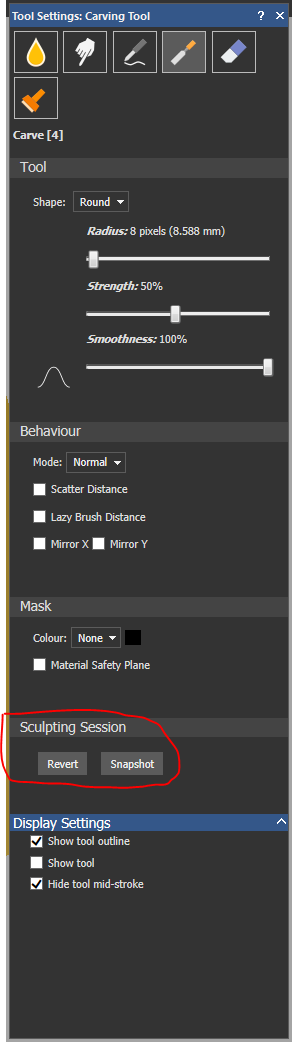
Have you taken a look using the shape editor, had a rush job with 7 models need a little height to the things (like .030") I kind of over did it (like .300") just a bit, the old saying "haste makes waste" just spent 20 min getting those things just right then to add 10 times the thickness, GREAT, well, saying to self, time to hit the back button a thousand times.
Hit the back button once and to my surprise it went down to where it was before, tried it on the 2 rail sweep also, did the same.
We have a winner, oh how sweet it is, a wonderful fix. A cool and wonderful THANKS to the team who gave this back to us. Now I have to spend a day modeling trying it out in all the tools.
A calmness has fallen on my work area, relaxation is now a wonderful fixation at how wonderful it is when I now get going too fast and I screw up I now just have to it the back button once just once or twice.
Mike
The problem with a number of the proposed work a-rounds is that you are assuming that the revert to point will be known in advance. Generally it is not. I agree with the OP, a list of steps in a drop down menu (much like the history function in Photoshop) would enable you to quickly go back and forth between steps and to revert to the exact best spot.
I should point out that the speed of reversion in either direction will likely NOT be as fast as would be ideal as processes in AC can be labor intensive. For the speed that is available in PS each step would have to be saved as a separate file? and this would likely mean a large strain on the PC memory. Even PS has a setting by which you can set the size of the scratch pad so that you do not have hundreds of undo points. I guess something of the same sort would be ideal in AC so you can adjust how many undo points are available based on your needs and your PCs capability to handle the workload.
Barry,
I was pointing out (just saw this yesterday) that we can now without a multitude of back button usage (over and over) we can now go back to the time with one usage of the back button, like in my illustration I needed .030 instead I used .300, thoughts of being disgruntled raised through my mind when I started the back button it set the models back to the import status. I did not assume anything. I do like the idea of having a drop down menu to set a time, but since the issue of going back after you just did an action was so labor intensive and mind numbing you could lose all sort of desire to finish the model because you with one action screwed up your work and could not fix it quickly.
mike
Please sign in to leave a comment.