Completed

Less Undos with Fade, etc tools
Permanently deleted user
At one point in Artcam's development, I could undo a Fade, Shape Editor, Smooth, etc function with one undo. Now it takes many undos to accomplish the same thing.
Comments
You still can, its the revert command on the tools interface bar.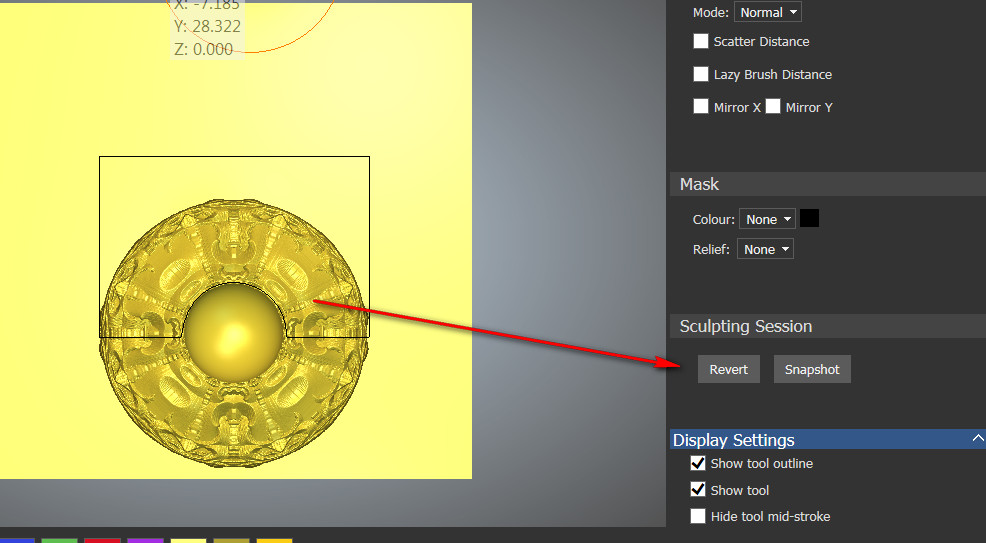
I see that function in the sculpting brushes, but not in Fade, Relief Editor, Smooth, etc.
Also, with a simple undo/redo I can toggle quickly backward or foward to see the effects of what I am doing and decide whether to keep it or not. That funcionality did exist before but got lost during an upgrade.
Yes, your correct about the fade and smooth functions, I thought you were talking about the smooth sculpting brush.
The 2 fade tools (2012 and Carveco - I upgraded from 2012 to Carveco so that's my frame of reference), look the same so I am not sure what you are referring to about a different reverse capability.
As for the smooth tool (not sculpting) I just took a look at the Carveco version and I do not like it but that may be just because I am used to 2012, I see where, in another post, you ask for more than 100% smoothing capability. I now understand what you are talking about. If you set the slider to 100% and just keep hitting Apply you will get what you are after (hit it 3 times and you have 300% smoothing).
You ought to try the shape editor, then hit undo. this has been a dirty word for me at times, now before doing shape editor I save it then if I make a mistake I just reload the shape, or I'll do a duplicate of the layer before. Barry this has been a problem since before 2015. The only saving grace the shape editor now has is you get to see what the thing will look like before committing to the shape, but still, sometimes after, it doesn't quite look right latter then holy smokes.
mike
Barry- for a stronger smooth I am indeed talking about the brush. I spend way too much time with that brush and I wish it would work stronger. However, after trying out the flatter profile (that you described for me yesterday) for Deposit and Erase, I tried it on Smooth. It does actually make it stronger.
I never would have guessed that turning the Smoothness all the way down on a Smooth Brush would actually make it do more smoothing, but that is what it does (go figure), so this should at least help with my issue.
As for the undo - let's take the Relief Editor for instance. Make a shape with it. Now if you Undo it (Edit menu), it will only Undo the fact that you closed the Editor. In order to undo the actual shape you made, it will take about 10-15 undos and each one can take a while. You used to be able to do undo the shape with a single undo.
Michael- Yep that's my point. You have to have a workaround for something that the program used to be able to very quicky do.
I think the reason a shape can look different after applying is because the shape itself is hard to see with the Editor on - you have the vector, and all points and handles brightly lit up, so they tend to obscure the shape. So I guess my new request is to be able to turn that off!
I did not realize that Mike, what a pain.
I am glad you found the less smooth brush setting to actually smooth more. It does seem counter intuitive but think of it this way, the higher the smoothness setting the softer the brush is, that is, your max smoothness with this setting is at the center of the brush and it gradually fades to nothing at the edge so yes, it will not smooth as much as a low setting for this control..
mike you might try the smudge tool at a very low setting, it actually does smoothing too, which is cool and it does it a whole lot faster then the smooth brush, but you have to be careful, then after you're done go to the smooth to finish.
mike
Hi Michael,
I will give the smudge a try next time. It always seemed unpredictable to me but in those limited instances I could see that it might help. Thanks.
I agree that undo action needs to be sorted out. It seems lopsided in the sense that action in some tools are one undo and others undo every little thing.
I think ZBrush has the best undo system. Just below the ribbon bar there is a visual set of indicators (one for every undo) where you can just click on any previous indicator and do a multiple undo straight away. Imagine an abacus of sorts ... just click on the bead you want to go back to. This is a brilliant way to handle it and something I'd like to see in CarveCo.
Please sign in to leave a comment.