How to permanently turn off vectors in 3d view?

Hi, today, when I opened Carveco my 3d views now have the vectors showing. I have had this feature turned off for years and I do know how to toggle them off and on in the 3d view. Where is the setting to turn them off ? Tyhanks and hope this makes sense.
Danny
Carveco Pro Version: 1.67 Build: 2026-07-03-1143-79fb7f9 © Copyright 2026 Carveco, Ltd.
Comments
Danny,
I use the menu bar a lot here's a screenshot, I sometimes need the vectors in the 3d view and sometimes I don't so I click this thing.Hope this is what you're looking for.
mike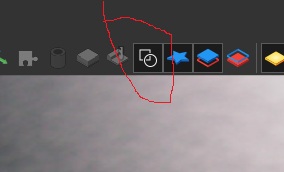
Thanks Mike, that’s exactly what I was looking for. I’d completely forgotten about that option in the 3D view.
Please sign in to leave a comment.