Multiple Roughing Paths / Different Sizes

Hi Carveco,
We are using Carveco Maker Plus and having a bit of an issue making certain 3d reliefs.
Some of our reliefs have detailed parts where a small bit ( let's say 0.5mm ) needs to be used.
But we don't want to carve out the whole relief with this small bit.
Our question is: How is it possible to have multiple roughing tools and the second tool wont rough parts that are already removed by the previous tool?
I circled the parts where we want to use a smaller roughing tool.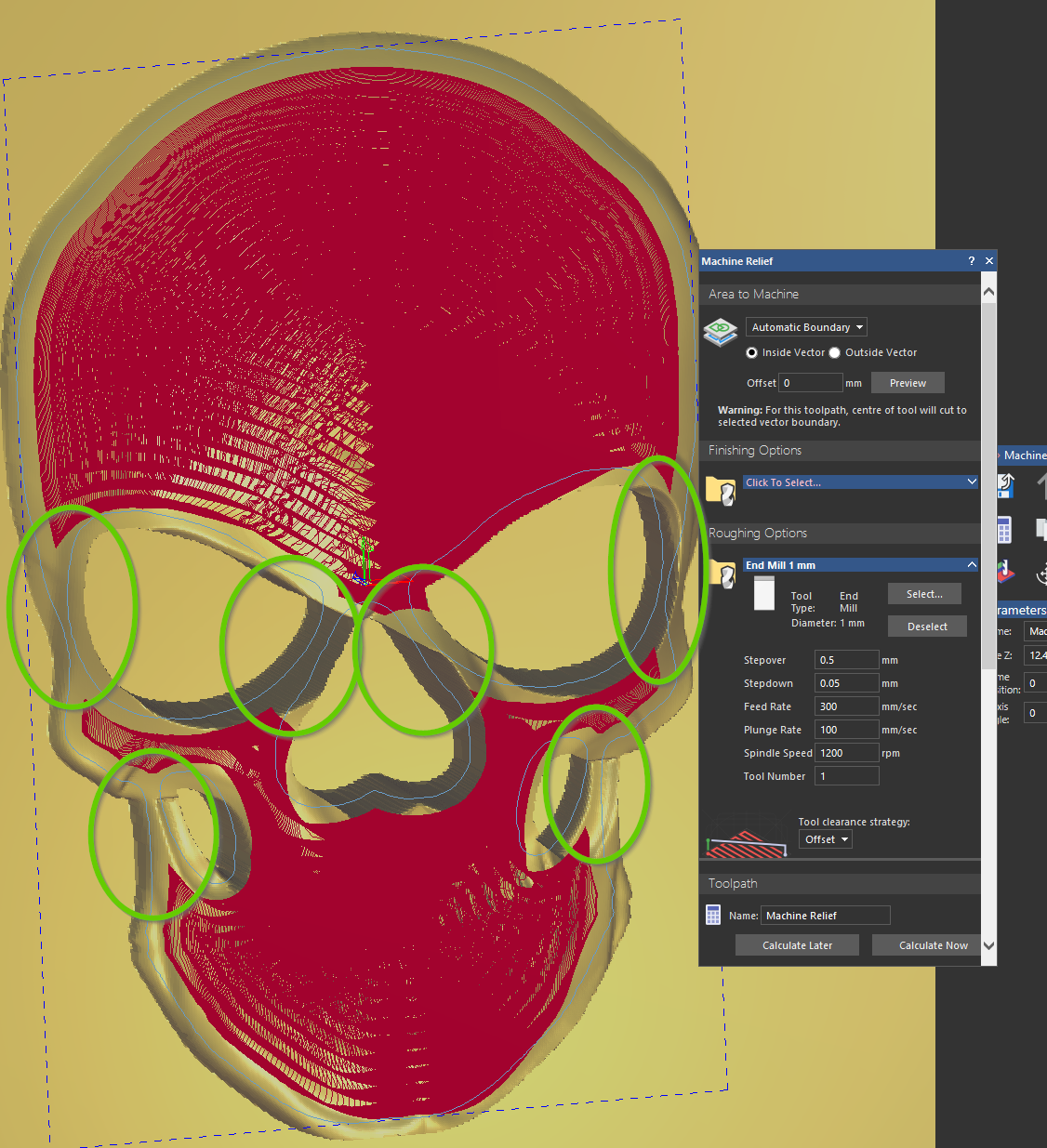
We use a ball nose for finishing, but it keeps breaking because it tries to clear the parts the big bit couldn't reach.
Any suggestions?
Thanks!
Comments
1mm is .039 inches, I take it this is your finishing tool?
Mind if I ask what is the size of your model?
Okay, for the most part, I, when I have problematic wood that chips I do it in stages of finishing tools (ball ends) I very seldom use the roughing tool path, I use multiple finish tool paths.
When I have a model that breaks bits I use the next tool up that I have then for the finish (last tool path) I use the smallest.
I Know this didn't quit answer your question, in reference to the roughing tool paths, maybe you can try the way I do it, might work.
mike
Hi Mike,
Thanks for taking the time to reply. We actually tried something similar and ended up using multiple roughing toolpaths before finishing with a single ball nose. We start roughing with a 1.5 mm (.059") end mill, and then run a second roughing pass with a 0.7 mm (.027") end mill to reach the tighter areas. Keep in mind that our reliefs are very small (they’re ice stamps). The problem is that having multiple roughing toolpaths is extremely time-consuming, because the second roughing path follows almost the exact same toolpath as the first one, which has already cleared about 90% of the material. So we’re essentially wasting extra hours.
What we’re really trying to do is rough out only the specific areas that the larger tool can’t reach, so we don’t waste unnecessary time and can get the job done more efficiently. I’m sure this must be possible, or that others have run into the same issue.
Another option would be to let the smaller bit remove only the remaining material, but ideally in a way where Carveco recognizes what has already been removed by the previous roughing pass.
Maybe someone from the Carveco team has a suggestion!
Have you thought of using different sized vectors, inside of the larger ones then running the tool paths? Just an idea. Doing this would cause the tool paths just to mill with in.
mike
Please sign in to leave a comment.