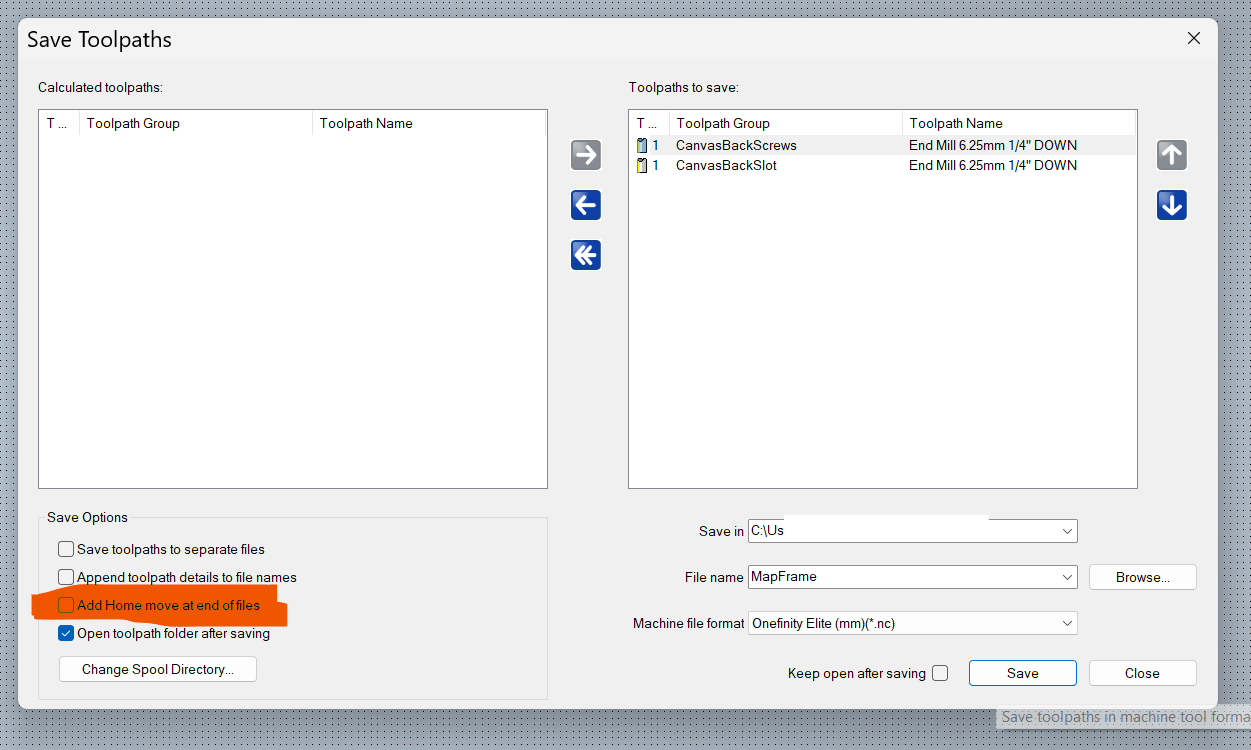
In the Save Toolpaths dialog, the "Add Home move" checkbox doesn't work. I don't want the gantry to move home, the checkbox is unchecked, yet it does move home.
What about when you set up in your toolpath? You can set the location there where you want the spindle to go, under the safe "Z" and home location. (that will not do the trick). I have on occasion moved my spindle to touch off the "Z" to another location and it went back there, for example move your spindle to (if your cnc can do it) 25 in the "X" start your toolpath, it'll come back to where you stared.
By the way thanks for asking the question, for me all the Icons have done above and beyond anything I could ever ask, so I never ask or search what check box's are for, I did this time watched a video I learned a thing or two.
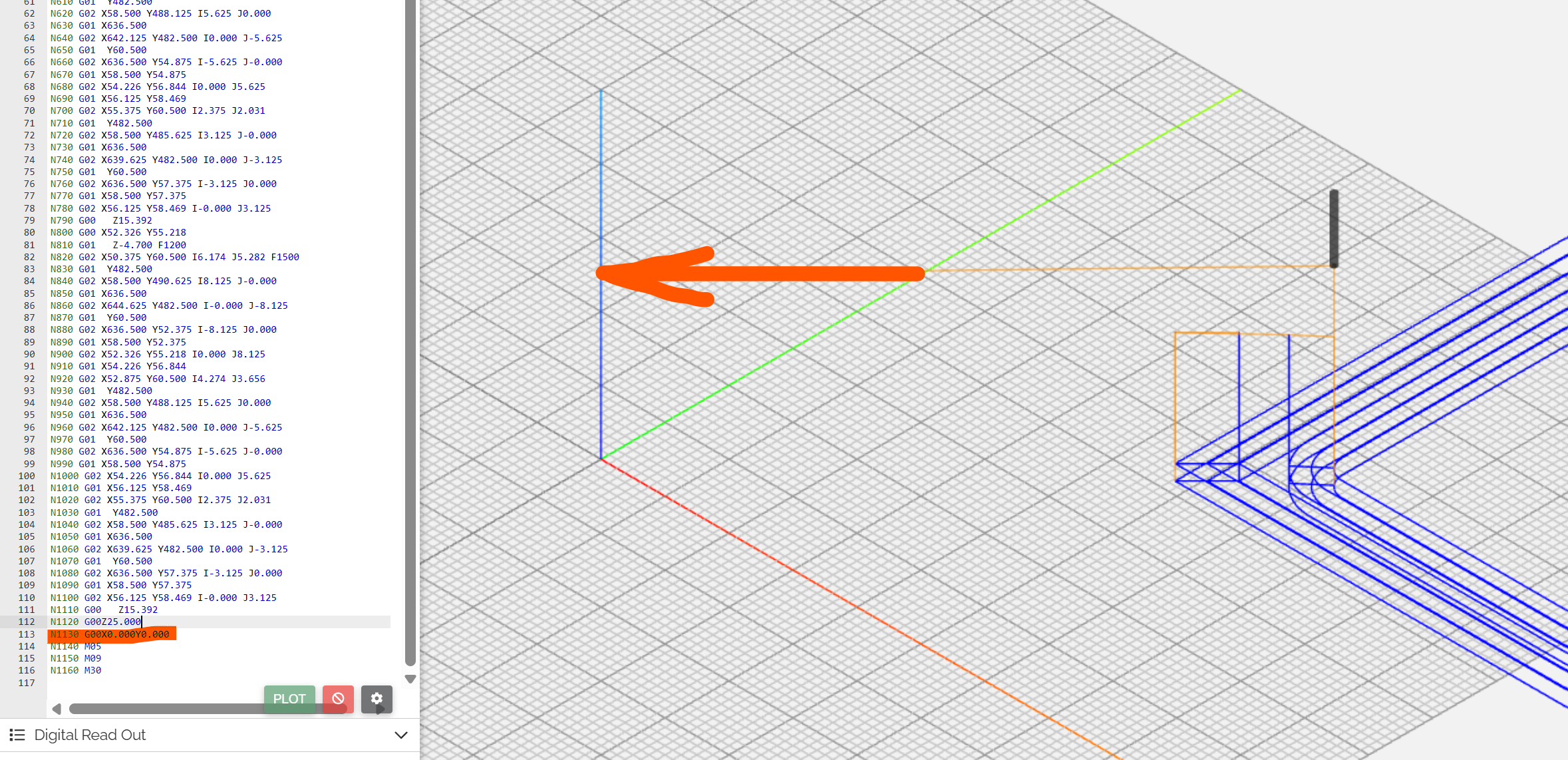
This is not only related with the option you choose in here. Also your post processor has some control as
END = "N[N] G00[ZH]" END = "N[N] G00[XH][YH]"
at the end of it.
You see these value at your toolpath ends on the NC code simulation.
You have to delete these two lines from your post processor. It is not recomended to edit post processors by yourself if you dont have exparience on it.
By choosing tick you mentioned at the Save Toolpaths, you just remove the green marked line from the NC code. Because of it is also inside the post post processor, you will still see the home positions at the NC code. Left is with the tick, right is without the tick. So, somehow you have to remove it from post processor too.
Michael Sherve, the scope of each path's home position is set to its default 0:0. The checkbox in the Save dialog is global, and it should affect all output.
Tayfun Türkmen that's insightful, I'll edit my post-processor. Much appreciated! The post-processor is "Onefinity_Elite_mm.con", and it does indeed have these "END" instructions. I still consider this behavior a bug, because it offers user interface that doesn't achieve its purpose, while using only CarveCo-supplied config. I would have expected such checkbox to support all the post-processors that come with CarveCo. Either remove the checkbox or have it support the bundled post-processors - otherwise it's a bug
I don't mess with stuff I am unfamiliar with like the post processor (mainly because I don't want to screw things up).
When I run file on my router (techno) I set the home position at "0" "0" the x and y, this is where the file (toolpath) starts from, If I move my spindle 10 inches either in the "X" or the "Y" after the file is run the spindle comes back to that moved area, always has, if it changes then I'm screwed because I have use this same operations over 20 years and I like the way it does it. I have set an index position on the "X" and "Y" on my router where I set my material, this way I do not have to reset the thing after each time I place material if I did it would frustrate me to the max as I am the only one here.
I gave you the way that work very well for me, if you feel you have the courage to mess with the post, go for it, I, for one, get rushed quite a bit so there is always (for me) a big chance of a screw up. My spindle and bit is out of the way so I don't bust the bit, it's clean and all I have to do is reset the "Z" if the material is a different thickness if I am zeroing off the top of the material.
I just wanted to clarify so there is no misunderstanding, only hope to help and am glad that Tayfun entered the discussion, he had a wonderful point of view.

Comments
What about when you set up in your toolpath? You can set the location there where you want the spindle to go, under the safe "Z" and home location. (that will not do the trick). I have on occasion moved my spindle to touch off the "Z" to another location and it went back there, for example move your spindle to (if your cnc can do it) 25 in the "X" start your toolpath, it'll come back to where you stared.
By the way thanks for asking the question, for me all the Icons have done above and beyond anything I could ever ask, so I never ask or search what check box's are for, I did this time watched a video I learned a thing or two.
I do appreciate the forum.
Thanks again
mike
This is not only related with the option you choose in here. Also your post processor has some control as
END = "N[N] G00[ZH]"
END = "N[N] G00[XH][YH]"
at the end of it.
You see these value at your toolpath ends on the NC code simulation.
You have to delete these two lines from your post processor. It is not recomended to edit post processors by yourself if you dont have exparience on it.
Tayfun
By choosing tick you mentioned at the Save Toolpaths, you just remove the green marked line from the NC code. Because of it is also inside the post post processor, you will still see the home positions at the NC code. Left is with the tick, right is without the tick. So, somehow you have to remove it from post processor too.
Michael Sherve, the scope of each path's home position is set to its default 0:0.
The checkbox in the Save dialog is global, and it should affect all output.
Tayfun Türkmen that's insightful, I'll edit my post-processor. Much appreciated!
The post-processor is "Onefinity_Elite_mm.con", and it does indeed have these "END" instructions. I still consider this behavior a bug, because it offers user interface that doesn't achieve its purpose, while using only CarveCo-supplied config. I would have expected such checkbox to support all the post-processors that come with CarveCo.
Either remove the checkbox or have it support the bundled post-processors - otherwise it's a bug
SP.
I don't mess with stuff I am unfamiliar with like the post processor (mainly because I don't want to screw things up).
When I run file on my router (techno) I set the home position at "0" "0" the x and y, this is where the file (toolpath) starts from, If I move my spindle 10 inches either in the "X" or the "Y" after the file is run the spindle comes back to that moved area, always has, if it changes then I'm screwed because I have use this same operations over 20 years and I like the way it does it. I have set an index position on the "X" and "Y" on my router where I set my material, this way I do not have to reset the thing after each time I place material if I did it would frustrate me to the max as I am the only one here.
I gave you the way that work very well for me, if you feel you have the courage to mess with the post, go for it, I, for one, get rushed quite a bit so there is always (for me) a big chance of a screw up. My spindle and bit is out of the way so I don't bust the bit, it's clean and all I have to do is reset the "Z" if the material is a different thickness if I am zeroing off the top of the material.
I just wanted to clarify so there is no misunderstanding, only hope to help and am glad that Tayfun entered the discussion, he had a wonderful point of view.
mike
There is another advantage to use END of the post processor. You can define a fixed position like;
END = "N[N] G00 Z50"
END = "N[N] G00 X0 Y1500"
It can move the head to the back side of the machine.
Please sign in to leave a comment.