Curves from DXF not milling smoothly

I am a 30+ year CAD designer. Started with ACAD and now use Solidworks.
I created a file in Solidworks and then used the dxf export feature to catch the faces of the design I was working on. The curves look like they are supposed to on the DXF:
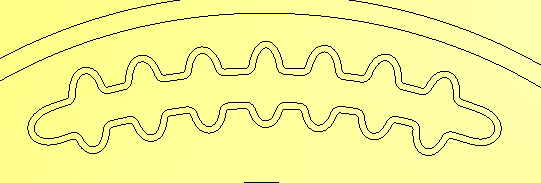
I use the "profile" tool in order to carve along the outside of the vector shown.
While the vector looks smooth (or as smooth as I want it to loook), I get these results when i calculate the tool path:
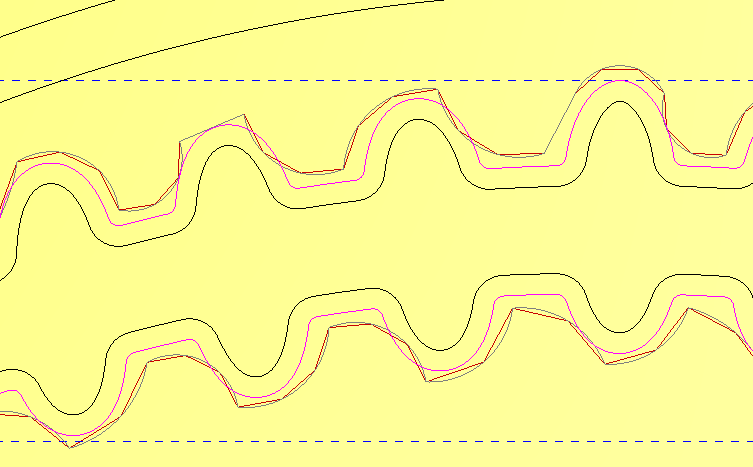
Why is it doing this? I have tried the "spline vectors" option (used 0.001). i also tried the "arc fit vector" command. No matter what I do, the toolpath still looks rough.
Admittedly, I have not cut this particular file yet. I cut a previous version and my cuts looked like the projecteed cut path in the second picture. I want to save my cherry wood and hope that someone can assist me with getting this cleaned up.
Comments
It looks like you have a machining tolerance problem in here. You dont need to spline vector to correct this issue. Just adjust the machining tolerance at your toolpath.
We use mm system in here so you have to change it with inches.
This is what I use for my tolerance, I use inches, also what was you model resolution, that might have a bit to do with it too. I make the biggest files because of this but I do get clean results.
mike
If you are machining only 2D toolpaths, resolution is only effect on simulation. It doesnt effect production quality of toolpath.
Here is the view of different tolerance values. Your toolpath looks more like the first one in here. Can you please increase the tolerance to something like 0,0001 to see the difference.
Thank you. This has solved my issue.
Please sign in to leave a comment.