Area Clearance leaving rounded corners

I'm sure this is an easy fix, but I'm new and struggling to find the right tutorial for this.
I'm trying to create a simple hold down clamp with steps on one end. I want to mill the entire thing with a 1/4" end mill. The vectors are all rectangles. Each step is its own rectangle so I can create a toolpath for each step at different depths. When I simulate, I wind up with material in the corners.
I understand that this roundness is because of the round endmill, but is there a way to let the toolpath travel beyond the rectangle, into the empty space of the outline so that it can result in all straight edges on the steps. I've attached an image.
Thanks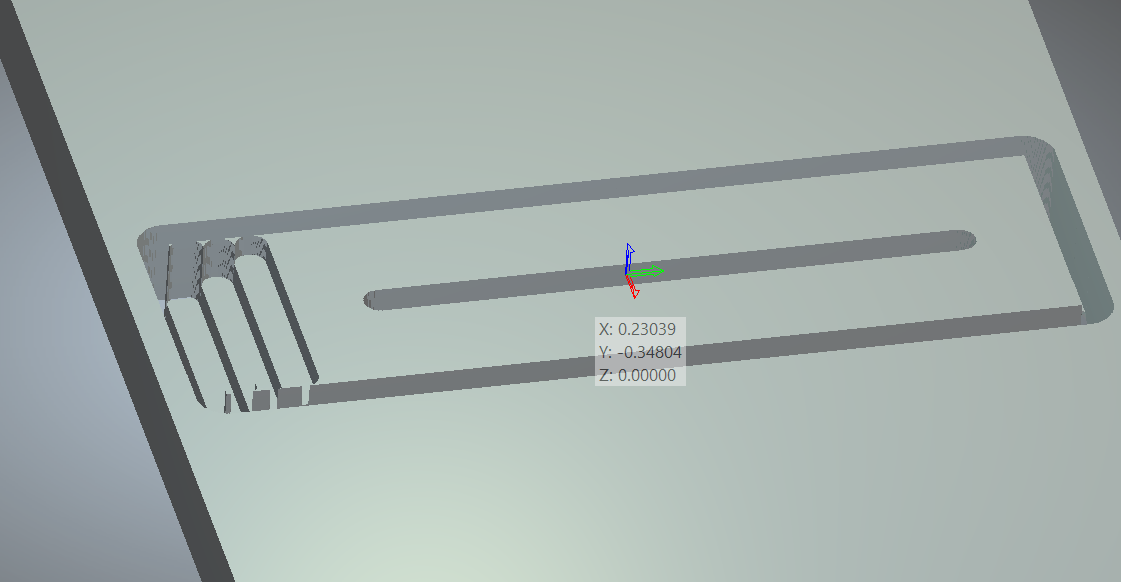
Comments
Montane,
You said each step is it's (has) it's own rectangle, just extent the rectangle by a little more than 1/2 the diameter of the end-mill on both sides so it clears the step when the bit cuts it to it's depth, then use a Profile toolpath (inside the vector) this should clean up your steps.
If you ever have a need to make an inside corner a little more sharp using the area clear toolpath you will have to use a smaller endmill.
mike
Montain,
Have you tried my suggestion in order to get rid of the leftover material on the steps?
You haven't responded, so I am kind of curious.
mike
Mike,
It worked perfectly. Thank you for the guidance.
I was hoping the software could automatically recognize that it could clear the area by extending the tool path into the dead space around it, but I understand why that is a challenge.
Montane,
Cool, am glad.
Have a good time.
mike
Please sign in to leave a comment.