Answered
Error during node editing

When editing nodes to "blend" letters together I am getting the following error. On one occasion Carveco exiting quite ungracefully.
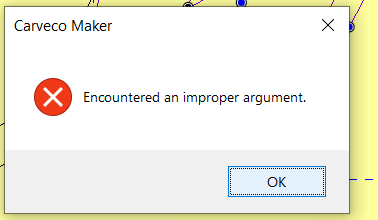
Comments
Hi John Veltre,
Please confirm what version and build of Carveco Maker you're currently working in by selecting the Help > About Carveco menu option in your Carveco Maker software. For example, Carveco Maker Version: 1.22 Build: 2021-05-28-1121-a821dde3.
Please try selecting the Window > Reset Workspace menu option in Carveco Maker, then click Yes in the two subsequent message boxes displayed. If you cannot see the Window menu option in Carveco Maker, please press the Alt+W keys on your keyboard to display the Window menu, and then select its Reset Workspace menu option.
Please confirm your results when replying to this post.
Thanks for your time and consideration.
I reset the workspace and got the same error. I am going to restart it and reset the workspace.
I can include my computer information as well if needed.
Hi John Veltre,
Many thanks for confirming that you're working in Carveco Maker Version: 1.22 Build: 2021-05-28-1121-a821dde3.
We've deleted your screenshot as it includes your registered email address, which we do not recommend that you share when posting.
If you encounter the same error message after restarting your Carveco Maker software and resetting the workspace, please confirm when posting again and we'll escalate your reported issue to a Support Request; you can share information about your computer privately within that Support Request.
Thanks again for your time and consideration.
Please sign in to leave a comment.