As an example, I am trying to create a pocket type cut such as 2" x 4" and .5" deep concave pocket length wise on wood such as a 2x4.
I have searched through the tutorial videos and come up dry. I am missing something. Purpose of such a cut would be to place a cylinder or glass to be held in place while engraving or etching with a laser. I hope my description is clear for the project. It can be any size and depth.
Which variant are you using?? Carveco the whole enchilada? Maker or maker plus??
Carveco..... In carveco just do a straight line (oops I bad vector) however long you want use a 1/2" ballend and use the profile toolpath, I imagine its the same in all variants of carveco.
Possible use for this cut out is to lay a small bottle or a metal item that is round in it to be held in place to either carve or etch the item so it does not move... basically a jig to hold various sizes of cylindrical items in place. (I don't want to hot glue the item to the waste board.) I would like to carve out what even size I want when needed. Possible example in photo attached... I hope it is there
How do I attach photos? I open insert image and chose file then nothing happens. NEVER MIND I FIGURE IT OUT(the photo upload).... file size restriction. I want to carve out a partial profile like this.. .25 to .75 inch deep/ It can be the end of the workpiece due to the flange of this part. Bottles, other cylindrical items etc...
You just want a straight curve right? like this? you can add any type of cutter, there are people out there that have different sized cutters for just the right size you will need.
If you want to model a depression then I could run you through that in the full version of carveco. Do believe it wouldn't be too hard, but then I am running short of cells to figure things out at times.
Ok I went to find my short-cuts for maker and maker plus, in maker plus you could easily do this there is a tool in that baby called the shape editor You could do a lot of shaping with I'm not too familuar with maker, and it would scare the crap out of me to work with it, I have been spoiled I have worked with the full version for over 20 years and to work with a stepped down one would drive me bonkers.
From what I see you would have to have a model made by another program bring it in and cut it out, would kind of suck to have to do that, if you got the plus this would open a whole new world.
Hi Mike. THanks for the info. I thought I was going nutz. There is no Shape Editor in maker. I thought I was missing something. THe upgrades are way out of my price range as I am new to this and trying different things. I have a 30X24 inch laser unit to compliment my Sienci Longmill 30X30" machine. Enjoying both. Both in garage with no heat, small heater helps but spend much less time in the cold for some reason. I'll look into other software that I have and not use like Fusion....(a brain cell destroyer) for some ideas.
$$1200 isn't bad, it isn't cheep, but it is not bad, in fact it is fantastic for what you will be able to accomplish with it, both with the modeling and the toolpathing. a LOT better than when I got into this game with Artcam in (well a long time ago, I think 2005) I didn't know squat, crud when someone said "vector" I had this starry look in my eyes and "what the are you saying" thought in my head. A whole new langue I had to learn,(in fact you all have the great videos, when I and Barry got into it we strongly suggested videos tutorials) I still say line, square, rectangle and circle, when I got insignia (I think that's how it was spelled) it cost me 3000 or maybe 3500 and I don't think it came with the shape editor so the price of 1200 is a wonderful price. I would be penny pinching like mad to get that sum, I would be selling my wife's kitties and anything that I didn't really like all that much, (don't ever let her know).
There are improvements that I would love to see in carveco (I hunger for them like crazy, because I know they would be a great help to the modeling and designing that I now do, they would cut the time that I sit in front of the computer modeling by 1/3, or maybe I would just get more models))))).
Hi Mike. Thanks for the info. Seems like none of my softwares like vectric vcarve and fusion trial versions of any use to me except to machine one of their samples. Again, fusion is very difficult to make something very simple....lol . I guess I can carve out a pocket of various lengths and widths to hold a cylindrical object from moving for now. Need to practice more and more and get my name out their. The idea is for this hobby to eventually generate some income. Can't get wood as all the stores are in lockdown still.😡 as I like to pick up some scrap wood to practice on.

Comments
As an example, I am trying to create a pocket type cut such as 2" x 4" and .5" deep concave pocket length wise on wood such as a 2x4.
I have searched through the tutorial videos and come up dry. I am missing something.
Purpose of such a cut would be to place a cylinder or glass to be held in place while engraving or etching with a laser. I hope my description is clear for the project. It can be any size and depth.
Which variant are you using?? Carveco the whole enchilada? Maker or maker plus??
Carveco..... In carveco just do a straight line (oops I bad vector) however long you want use a 1/2" ballend and use the profile toolpath, I imagine its the same in all variants of carveco.
mike
I am using this:
Carveco Maker
Version: 1.20
Build: 2020-12-14-1614-cd5dbac1
© Copyright 2020 Carveco, Ltd.
Possible use for this cut out is to lay a small bottle or a metal item that is round in it to be held in place to either carve or etch the item so it does not move... basically a jig to hold various sizes of cylindrical items in place. (I don't want to hot glue the item to the waste board.)
I would like to carve out what even size I want when needed. Possible example in photo attached... I hope it is there
Possible example in photo attached.
You just want a straight curve right? like this? you can add any type of cutter, there are people out there that have different sized cutters for just the right size you will need.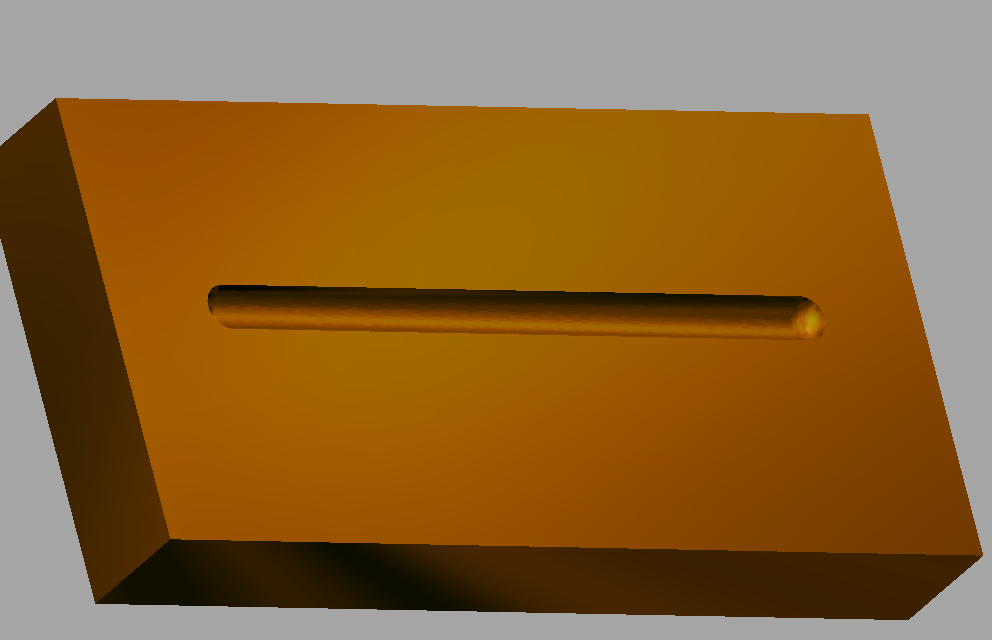
If you want to model a depression then I could run you through that in the full version of carveco. Do believe it wouldn't be too hard, but then I am running short of cells to figure things out at times.
Ok I went to find my short-cuts for maker and maker plus, in maker plus you could easily do this there is a tool in that baby called the shape editor You could do a lot of shaping with I'm not too familuar with maker, and it would scare the crap out of me to work with it, I have been spoiled I have worked with the full version for over 20 years and to work with a stepped down one would drive me bonkers.
From what I see you would have to have a model made by another program bring it in and cut it out, would kind of suck to have to do that, if you got the plus this would open a whole new world.
mike
Hi Mike. THanks for the info. I thought I was going nutz. There is no Shape Editor in maker. I thought I was missing something. THe upgrades are way out of my price range as I am new to this and trying different things. I have a 30X24 inch laser unit to compliment my Sienci Longmill 30X30" machine. Enjoying both. Both in garage with no heat, small heater helps but spend much less time in the cold for some reason. I'll look into other software that I have and not use like Fusion....(a brain cell destroyer) for some ideas.
$$1200 isn't bad, it isn't cheep, but it is not bad, in fact it is fantastic for what you will be able to accomplish with it, both with the modeling and the toolpathing. a LOT better than when I got into this game with Artcam in (well a long time ago, I think 2005) I didn't know squat, crud when someone said "vector" I had this starry look in my eyes and "what the are you saying" thought in my head. A whole new langue I had to learn,(in fact you all have the great videos, when I and Barry got into it we strongly suggested videos tutorials) I still say line, square, rectangle and circle, when I got insignia (I think that's how it was spelled) it cost me 3000 or maybe 3500 and I don't think it came with the shape editor so the price of 1200 is a wonderful price. I would be penny pinching like mad to get that sum, I would be selling my wife's kitties and anything that I didn't really like all that much, (don't ever let her know).
There are improvements that I would love to see in carveco (I hunger for them like crazy, because I know they would be a great help to the modeling and designing that I now do, they would cut the time that I sit in front of the computer modeling by 1/3, or maybe I would just get more models))))).
mike
Hi Mike. Thanks for the info. Seems like none of my softwares like vectric vcarve and fusion trial versions of any use to me except to machine one of their samples. Again, fusion is very difficult to make something very simple....lol . I guess I can carve out a pocket of various lengths and widths to hold a cylindrical object from moving for now. Need to practice more and more and get my name out their. The idea is for this hobby to eventually generate some income. Can't get wood as all the stores are in lockdown still.😡 as I like to pick up some scrap wood to practice on.
Please sign in to leave a comment.