rotation center of imported 3d files

Importing STL and OBJ files is a big part of my workflow, and I frequently run into difficulties because the coordinate system relative to which these imported files rotate and scale, shifts with each new file. Is there some way to reset the "World Center"?
I hope this question makes sense. Thanks in advance for any help!
Comments
Witam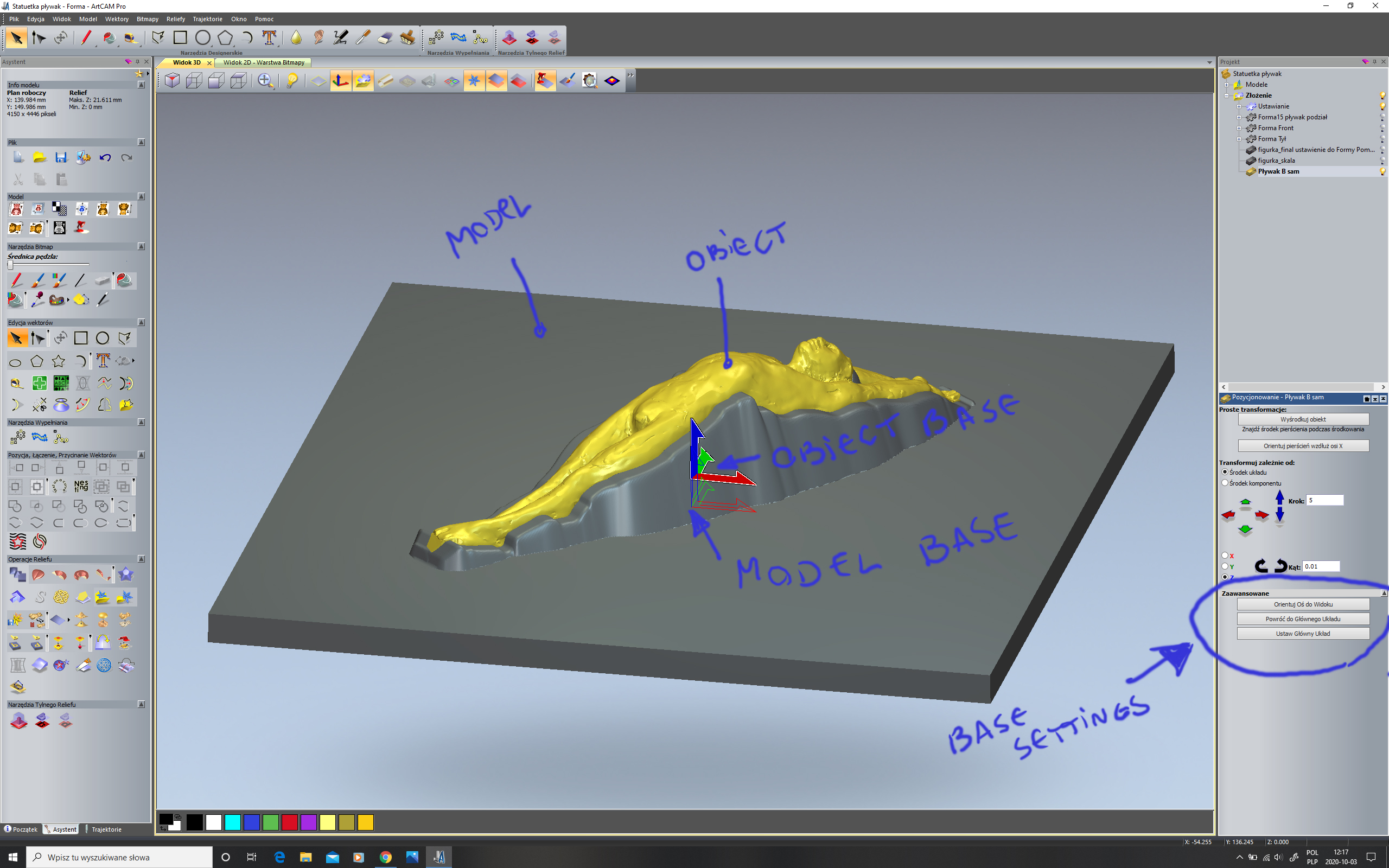
W starym ArtCAM-ie pro tworzę nowy model z bazą w środku, importuję obiekt, ustawiam go z jego bazą lub opieram na modelu. Na obrazku jest menu, którego używam. Prawdopodobnie podobnie jest w Carweco.
pozdrawiam Piotr
Thanks for your reply Piotr. Google Translate did not yield intelligible results for me, but your image was very helpful. The buttons that you highlighted had not previously been visible to me, and I never noticed the little arrow which allowed me to show them.
Chris,
If your 3D model is just going to be used as a single sided relief - in other words, machined from one side, then the easiest way to do that is to just go up to Relief->Import 3D Model. You can translate the model using the existing coordinate system - or just paste it into a new layer and move it around as required with the cookie cutter tool.
If it is a full 3D model, you'll have to pull it in using the method Piotr shows by creating a new Project and using the transform functionality there. I think what Piotr was trying to point out to you is that sometimes, some kind of 'companion' or construction geometry, not part of the model in question, can be helpful when positioning it in 3D space. I've often used planes, cylinders, cubes etc as 3D indicators that I've imported separately in order to get the model in question positioned precisely. You may find that to be a worthwhile technique as well.
As you can see, Piotr has the 'important' model selected in gold, but underneath, you can see he has imported another piece of geometry - 'Model Base' - and you can see multiple 3D components in the tree above the transform area. Personally, I prefer to use something like Rhino to do all of my transformations in full 3D - and that includes any companion geometry that may be used for alignment in Carveco. Then I just import them in one at a time with no transformations until they are all in...then apply the same transformations to ALL should I need to, to maintain the precise alignment I've already done in Rhino. Truth be told - I may even transform the parts in Rhino via trial and error and export with origin until I get them dead on where I want them without any transformations in Carveco.
Not sure if all that is helpful or not. If you can show an example of a project that illustrates your issue, I could help more.
Please sign in to leave a comment.