Relief Import - Bug or Feature?

Hey kids - check my work here...I just discovered that 'Import Relief' if you right click on the layer tree is NOT AT ALL the same as Import Relief from the pull down menu.
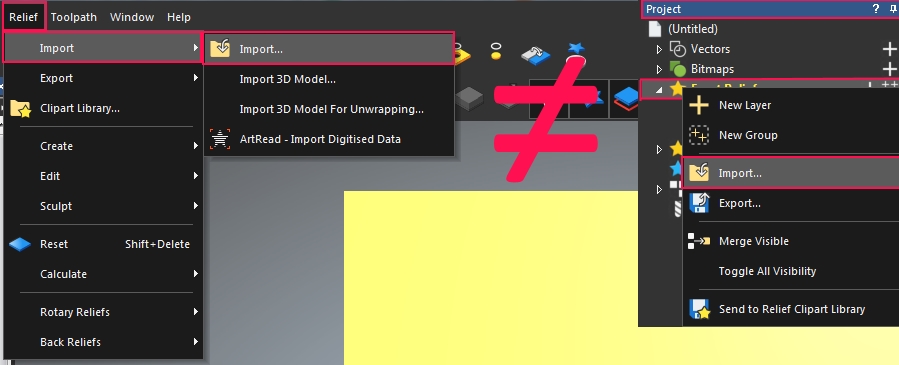
Background: I created a relief using a 24x24" model space & exported the RLF in question. I then created a new model space that was 12x12", used Import Relief from the layer tree (right click) and it comes in way too small...this is NOT import relief, but rather 'Load relief' from the old legacy commands...which I have never found useful - ever.
Whatever that command calls up, it should not be labeled 'Import Relief' - or it should call up the same command as the Import Relief from the pull down menu. If it is the legacy 'Load Relief' it should be labeled as such. Can I get a witness?
Comments
I suspect its a bug,,,,,,,I hope support comments but they seem to be rather scarce on this rather quiet forum.
Good spot Brady, it happens here too. Thought it might have been an imperial bug but happens in metric too.
Thanks for the feedback, Leighton.
I have a growing list of bugs, wonky behaviors and other inconsistencies that I'd like some resolution on but I really don't know the proper path to present them...Some are features...some are just plain old clunky, outdated or just not very well laid out that need polishing or enhancing - If you are like me & aspire to 'play the software like a fine tuned instrument' to keep the pipeline moving with velocity - because as you know, time is money. Please up vote this thread if you have interest in what I mention or add your own things that you've found to be broken or clunky. Maybe my Scotch is showing...but I'm not going to keep re-upping maintenance unless I see the program get polished up.
For instance:
1) Allow 'P' to change the start point (like it used to be) on a vector without the need to toggle on node editing mode.
2) Automatically populate the file name field with the layer name when you export a vector or relief layer.
3) *HUGE* - Nail down working file folder consistency...If I open a RLF from a folder..make THAT the folder for everything else etc...or if I save the .ART to a file - same thing...For reasons unknown to me, it still wants to look at a folder from 3 jobs ago...even after doing I/O of every file type (vectors, reliefs & .ART). This happens on Win7,8 & 10 (all Pro)
4) Add Incremental save to the File menu...E.G. - Rococo.ART....increment...Rococo_1.ART; *_2 etc
5) Consolidate Join/Close vectors into one tool. Don't make me have to think every time...If it's 2 disjointed vectors, join them - else, it's one open vector, close it.
6) Restore the Transform tool scale by percentage slider...It's nice to not have to hunt/peck numerical percentages.
7) Always on Cookie Cut Mode - allow reliefs to be moved/transformed etc by simply holding down a key. Doing the cookie cut dance & all that is entailed with pasting it back in is cumbersome - Take a lesson from Vectric Aspire (but not the cartoon resolution wash out part)
8) We need a Lasso selection tool - not just a rectangle lasso selection tool.
9) Remember last chosen Vector format type - What is a .DGK? Don't care to know. Peg it to EPS or DXF and leave it there unless I change it.
10) Fix bug with Transform tool not updating size of part bounding box when part is rotated. You have to cycle the Transform tool for it to update. Very painful if you need this...
11) Relief import - as mentioned a the top of this thread.
12) Toolpath Bridges - clearly one of the clunkiest, non-user friendly things about toolpath generation. Just horrible. Make adding bridges easier & store tab locations when a vector is copied so you don't have to go through 'all that' again.
13) Sort out layer selection...is it selected...or yellow...or did I want to rename it...It's clunky.
14) The colors of the interface are pretty bad in my opinion. Give the option to change the background color from 'I'm a 17yr old kid and the black background let's me lurk in the dark' to something men of a certain age can actually see...since we're the only ones who can afford the program to begin with.
15) Add to right-click context menu Copy relief to {New or existing layer}, Copy vectors to {New or existing layer}, Copy vectors to {New or existing Sheet}
...I am sure there are more...Thanks for listening.
Please sign in to leave a comment.