Answered
Does Carveco Maker support .ttf and .otf font filetypes?

I would like to import my own fonts into Carveco Maker. My Mac is using .tff and .otf font file types. I tried importing .ttf and there was no font visible. The bounding box was there to be seen and it appeared to occupy the right sort of space. Possibly it is my (mis)use of the Windows 10 home environment.
Thanks for any and all answers/assistance received.
Comments
Hi Jeff,
All Carveco products support TrueType and OpenType fonts. The Tool Settings: Text Tool panel's Font list within Carveco Maker is built from the collection of TrueType and OpenType fonts installed in C:\Windows\Fonts on a computer. Therefore, if you download a TrueType or OpenType font of your choice, then install it to C:\Windows\Fonts on your Windows 10 virtual machine, that font should be available to select from within Carveco Maker when you restart the software.
Please check and ensure your TrueType and OpenType fonts have an associated preview when browsing C:\Windows\Fonts on your virtual machine.
If you have any further questions or requests, please do not hesitate to ask.
Thanks again for your time and consideration.
Carveco Support:
I just checked the C:\Windows\Fonts\ directory on my Win 10 laptop and there are many more fonts in the directory than appear in the dropdown list in Maker. Is there something I need to do to make all the fonts appear in the dropdown list?
Thanks for the prompt assistance. I will sort that issue out later today.
Hi Ollie,
Ollie Snyder wrote: I just checked the C:\Windows\Fonts\ directory on my Win 10 laptop and there are many more fonts in the directory than appear in the dropdown list in Maker. Is there something I need to do to make all the fonts appear in the dropdown list?
Please check and confirm whether all of your fonts in that location are in either TrueType (*.ttf) or OpenType (*.otf) format which have an associated preview; these are the only fonts compatible with Carveco software.
Thanks for your time and consideration.
Thanks for your time. You are correct - most are .fon files. Is there any way the convert them to .ttc files?
Hi Ollie,
Although it's not something we've used ourselves, you might want to try this free online service which claims to be able to convert .fon files to .ttf files: Convert Font Files
Please share your results with the community when next commenting on this post.
Thanks again for your time and consideration.
I spent some time moving some .otf and .ttf fonts into the correct directory. Quite a few are still not showing up in the Carveco Maker software.
Within the align vector function is there a means of distributing the various vector entities around the model space?
I find that the reference manual does not remember where it opened too. That is the page size reverts back to very small and has to be opened again. Is there a way to make the reference manual pages persistent for size and location?
thank you for the assistance.
Hi Jeff,
Please share an example of a TrueType or OpenType font found in C:\Windows\Fonts on your computer which fails to be included in the Text Tool panel's Font list within Carveco Maker. You can use the free WeTransfer service's Get a link option to generate a direct download link which you can then share when posting to the Community: https://wetransfer.com/
Please watch the following demonstration videos included in our Carveco Fundamentals training course:
Please explain exactly what you mean by the "align vector function", preferably using screenshots to illustrate.
It is not possible to add a bookmark to the Reference Help and CHM files (the format in which the Reference Help is compiled) do not retain information about the last-used size and position.
If you have any further questions or requests, please do not hesitate to ask.
Thanks for your time and consideration.
Thanks for the information about the Reference Help format.
The fonts which do not work carry the filetype .ttc (true type collection) which may well be the issue. I have quite a few font families that include as many as 9 or 12 weights in the same typeface. I will convert them back to .ttf and I feel sure that will cure the issue.
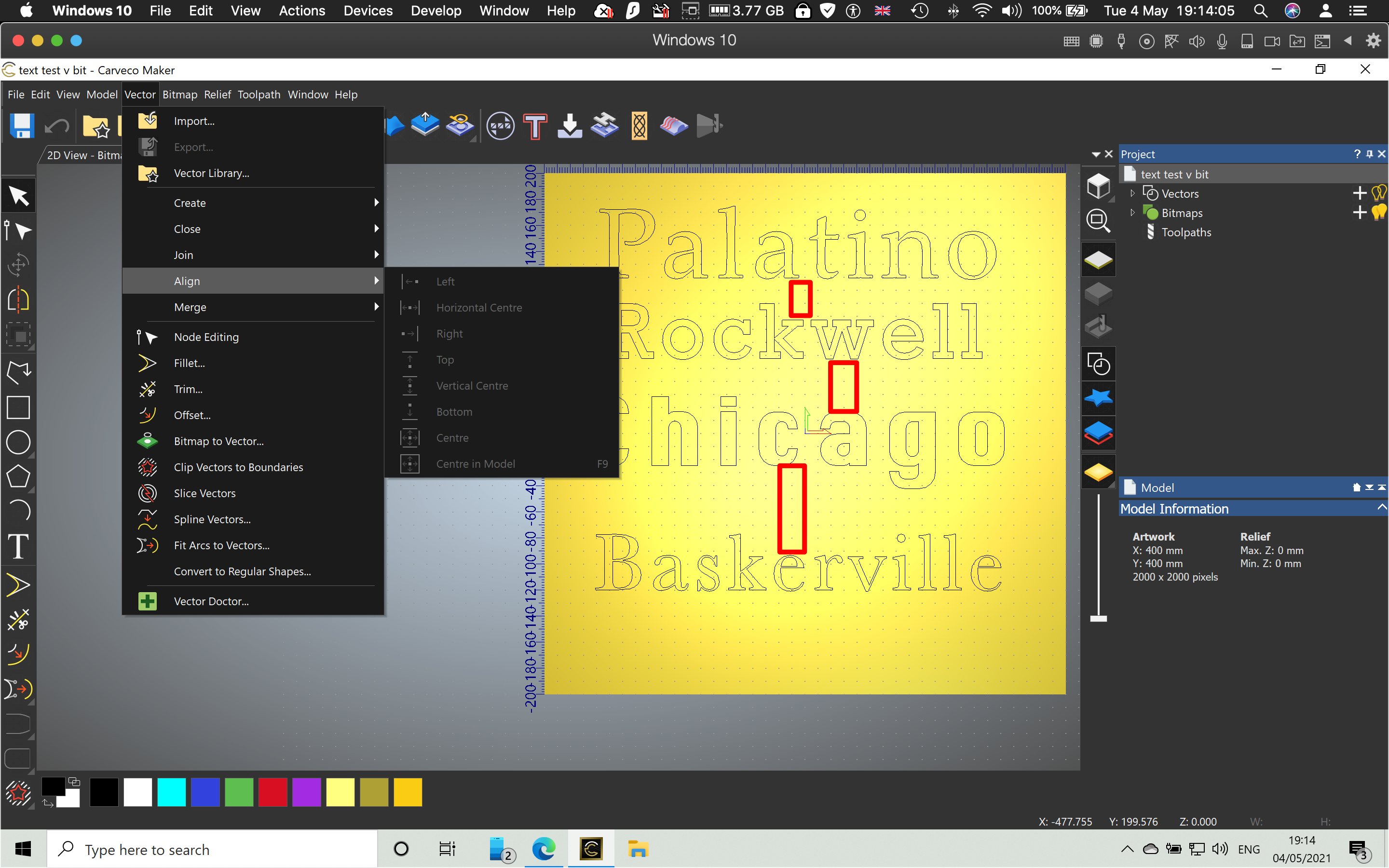
Under the vector heading there are a lot of options for alignment of one element to another. In the screen shot of text, you will see that all of the rows of text are differently spaced from each other. The red boxes denote the spacing. A distribute facility allows the spaces between the rows of text (the separate elements) to be made regular. I have not found a distribution facility.
The second screen shot shows my photo editing software. It demonstrates three columns of elements. From the left to right, column 1 shows unevenly spaced elements and they are not aligned. The middle column shows aligned elements that are still not spaced evenly. The right hand column shows all elements aligned and evenly spaced.
On the menu bar it shows a legend distribute vertical centres and that is the 8th symbol from the right of that group of alignment and distribution symbols.
Thanks.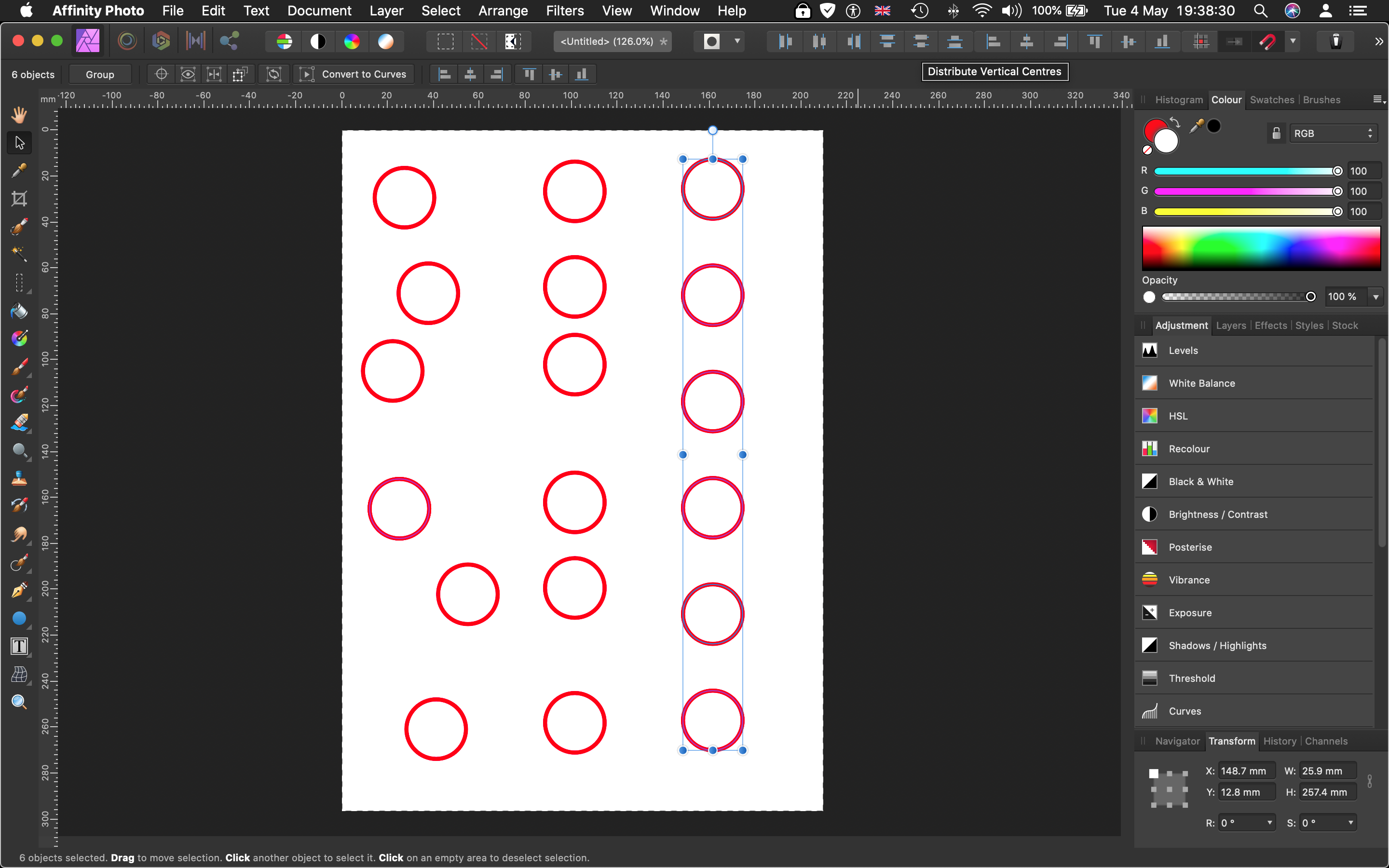
Hi Jeff,
As previously stated, all Carveco products support TrueType (*.ttf) and OpenType (*.otf) fonts; TrueType Collection fonts (*.ttc), an extension of TrueType format, are not supported.
Regarding alignment of vectors in Carveco Maker, please watch the following demonstration video included in our Carveco Fundamentals training course: Aligning Vectors
There is no "distribution facility" available to use in Carveco Maker, similar to what you might be using in your Affinity Photo software. With that said, we'll give this matter some further thought and provide you with any suggestions which might help you to achieve your intended results.
Thanks again for your time and consideration.
Hello. Thanks for this informative posting.
I thought as much with regard to the font families. Once the .ttc fonts were converted, they worked just fine. My own fault for not realising that out of the 700 typefaces which I use regularly, about 25% of them are large font families and I had forgotten how they were arranged. The Mac handles fonts a little differently to a Windows PC. My apologies for my stupidity.
I had no difficulty aligning the vectors in Carveco Maker. It is a standard operation which I am used to undertaking in many of the design software packages which I have used during the last 30 years. Think Freehand, Pagemaker, Tex, Illustrator, Photoshop, Affinity Designer, Pixelmator, Acorn, Sparkle, Affinity Phot, Affinity Publisher, Indesign, Quark et al. I have watched all of the fundamentals presentations and some that are very useful but were not in that particular bundle video presentations.
Distributing multiple design elements is a key part of efficient design, especially when importing a design where one wishes to change the relationship between some of the key elements. That demonstration in the screenshot took about 10 milliseconds to achieve... where each of the six elements was equally spaced from each other after being randomly distributed vertically.
Please sign in to leave a comment.