can the AI tool cut this part or how to get carvco

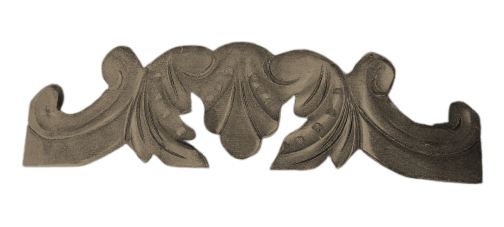
I am trying to see if carvco maker can cut thsi part out. I tryed the new AI tool and its not going well. does any body have any thoight how i can make this ? this piace is a 8in long 4 wide with a 4 in bow init
sorry if i am not explaining my self correctly
Comments
Jerry,
You can give it a try, but I'm thinking you will need to use the 2 rail sweep, the shape editor, and possibly the angled plane tools, at least to get a nice model.
The picture isn't very clear (for me, anyhow),
I don't think AI is far enough along to get things like this.
mike
I have been meaning to give (show) what I mean. this first picture is what I did about 10/15 tears ago. It came out really nice and was accepted right away, it's clear the measurement's are what was asked for the height was what was ordered, no complaints what so ever. I did this with the shape editor and the 2 rail sweep, I have been using the pro software for about 20/25 years.
mike
Now to verify if I was correct, this second pic was after I used the AI, it is not very nice there is a requirement to clean it up, if you have maker or plus I don't think you can. I could be mistaken but I am fairly busy so I don't want to find out. In my opinion you would be best served by purchasing the Pro version of Carveco, There are so many things you will be able to accomplish it is a fantastic software, the support is great, even in their adds for the software they state that there are some things that the AI can not do.
mike
ps. I tried this a few different ways so you might be able to judge for yourself, is it better to do this with the 2 rail sweep and the shape editor in Carveco, or the AI in Carveco, by the way googles AI doesn't do as nice a job.
Please sign in to leave a comment.