Resolving (apparently) non-existent issues

I'm brand new to Carveco (and CNC), and just trying it out. I have a complex shape which was originally made from a complex font. I've had multiple intersection errors and have identified them with the Vector Doctor, and fixed them. However, when I try to add a toolpath, it still gives me an error - "the selected vectors self-intersect". When I run the vector doctor again, it doesn't find anything. How do I resolve such a thing so that I can move on?
Comments
Rich,
Sometimes a picture can help resolve some problems.
I take it you're using Maker or Maker Plus.
I use the Pro, I haven't gotten around to installing either of those, so I'll have to go on memory.
If you zoooooooommmm in as far as you can go you sometimes can find the offending "node" and fix it by either deleting it or moving it, even "soothing" it sometimes will fix it.
When using the "Vector Dr." zoom in to where ever there is a red dot and fix it one at a time, fonts are a big problem (they look cool, but) and they take time to fix.
There is another fix to try and that's to use the "Offset Vector" tool, you don't usually have to offset the vector much to fix the issue. The thing is you probably have a million of those little things to fix and it's sort of time consuming, but usually worth it to get something nice.
mike
I managed to fix the problem by increasing the tolerance in Vector Doctor until it showed me errors, and I was eventually able to fix them all and get a successful tool path.
I'm new to Carveco, so maybe I'm not understanding this, but it seems that adjusting the tolerance for finding errors would eventually cause any two adjacent vectors to be problematic, so how do you know at what point the software is detecting these errors before you enter vector doctor? In other words, what threshold triggers an error in your tool path creation?
I like most of what Carveco is about so far, but this is one area that is really holding me back. It's like asking Google a question, and it throwing back an error telling you that you're missing punctuation, and refusing to answer you, but also not attempting to fix the problem or telling you how to fix it. There should be a threshold of error acceptance. I've been using vector graphics software for years, so I am somewhat familiar with the tools, and some of the peculiarities of what makes paths etc. When I went through and fixed the errors in Carveco, the outcome was always the same - I wanted my vector to follow the original path as closely as possible. I could understand laser engraving being a little more fussy, but anything else - really, it should be able to overlook tiny issues that would never be seen on your finished piece, and make a judgment call on what it thinks you want to do, based on some sound practices. It seems that it can't. I get that the developers probably want you to have as much control as possible over what is possible, which is why it leaves all the decisions to you, but if it makes you make the decisions, but only accepts one answer, what's the point?
I'm really hoping to get past this kind of issue - I like Carveco better than any of the other applications I've seen, and for the most part it's fairly intuitive. But the constant errors are really a buzz kill. Sometimes you have to work with less than perfect sources, and that's just life.
I have no aspirations to make money from cnc machining - just want some fun, but if I was trying to make a living from it, I can't imagine trying to explain to a client why their logo vector artwork that they paid thousands of dollars for and works for absolutely everyone else, doesn't work for you.
Food for thought maybe? I don't mean to be all negative on the forum, especially as a new user. Hopefully my future shares are of a more positive experience with Carveco!
Rich,
I'm the type to try to look for a solution, been doing that my whole life. I do appreciate it when someone can use common sense in their explanations mine are more direct (this works, this doesn't type) When you have a font that has a line (vector) that overlaps it could cause the router to snap, jitter, or stop (something gets messed up) as far as I understand it, don't know been doing this for so long can't remember.
Most of the fonts I purchase are around $10/$20 if I remember correctly and most can be fixed rather simply (just redraw them) that's what the "offset vector" tool does and it gets rid of those pesky little overlaps, the thing though is it leaves a lot of nodes (my Achilles heel) I like as few as are needed, but it does the job. Like I said I haven't got "Maker, or Maker Plus" installed to remember the limits of the tools that are available. I really like the "Pro" for what I do, for me it's more than fun it's relaxing, encouraging and very pleasurable, I don't have to run around like a squirrel to get things done, I don't have to search for words and get frustrated when I misspell them or can't recall them, it's like doing a search on google (or something else) me laughing here) getting irritated because I know what I want but have to read all that other crap only to find they don't know what I am asking.
Anyway have a good one.
mike
What you say about overlaps and broken bits makes sense. However, there has to be a threshold that it should be able to smooth out and avoid it. Maybe it sets a conservative value by default, and you can change it in settings.
Every conversation I see around vector doctor blames fonts (incidentally, in my case it wasn't the text that was the problem). Its a bit of an arrogant stance to be honest. If there's something that you know causes problems, and you can do something about it to benefit your customers, then it would be great customer service for you to do it.
I'm a customer also, and hoping I don't sound arrogant.
I'll have to look at the settings to figure out some stuff, but in reality I have my own stuff to do, not really looking to start anything just looking to help the best way I can.
mike
Hey Mike, I'm not saying you're arrogant, I'm saying the developers attitude is. Sorry... Just having a dialog, and didn't mean to offend you - I appreciate your responses.
I'm not offended, just trying to help. I don't think the software or support within Carveco that are arrogant, we all see things from our own perspective, I don't know what kind of work it takes to design software, to me it's another world entirely, a foreign language if you will, I'm totally lost in the concept.
I haven't done any "V" groves in a long time so....... I uninstalled as many fonts as I could that were a problem for me in my work, needless to say I took a screenshot of what I found that got rid of the green round dots, in the tolerances.
The reason that fonts get the dirty word treatment is because they cause the most problem for new people, when you've played with the software for 10/20 years you just roll your eyes and fix it (you have a job to get done). I remember a font that really got me going (can't remember what it was though). Font design is another area, like software designs that is totally foreign to me something I don't think I could do, those people have a special type of skill that is way beyond me. I know that they (look like to me) are going after a look (like I do I guess in what I model) so they do not have to consider how their fonts distort everything where it comes to machining just a cool look, which is cool.
Anyway pic time.
Mind you I haven't tried to run a toolpath on these just used the vector doctor, I'll have to find a font that causes me dirty words and see if I can remember this post to put how I fixed the issue. Please remember that fonts are someone else's creation not Carveco's they have tried to give us the tools to fix them (time consuming to say the least).
Have a good day.
mike
Higher tolerances can sometime cause a problem
Lower tolerance
This one has an over lapping problem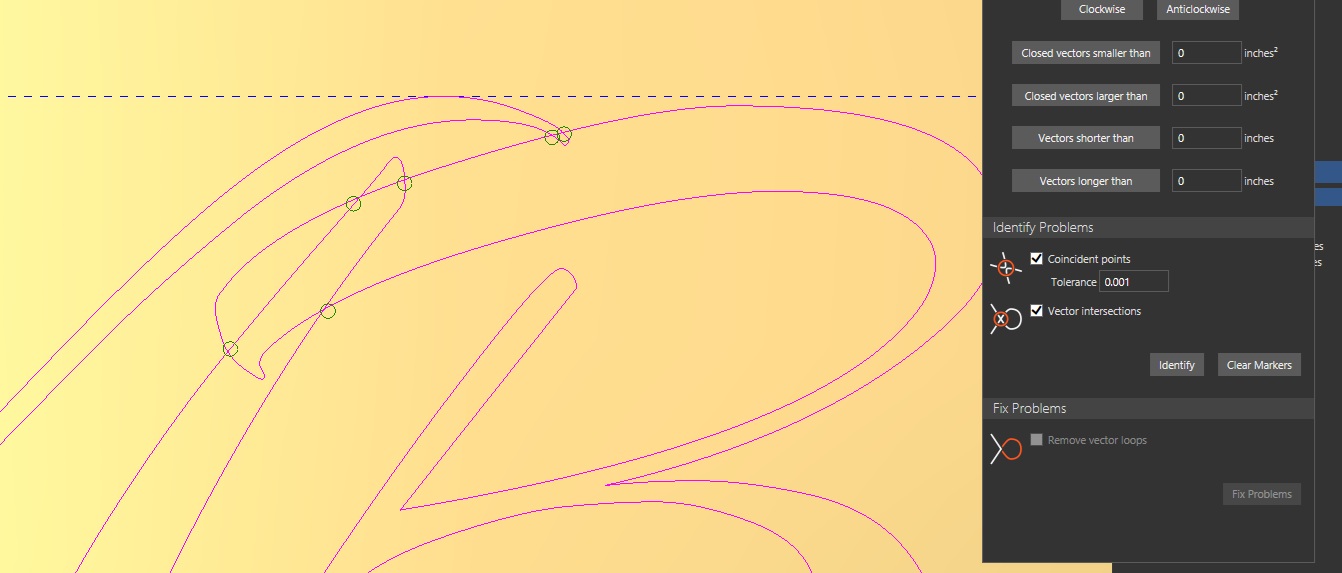
Please sign in to leave a comment.