3d Relief small details

Hello everyone,
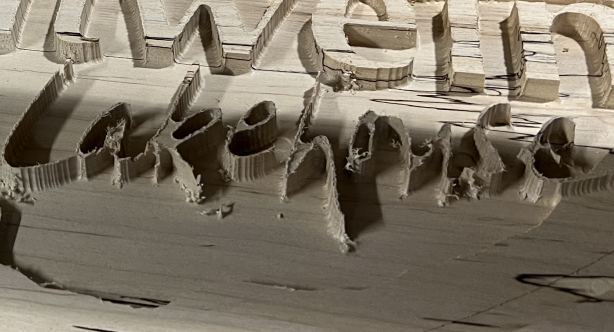
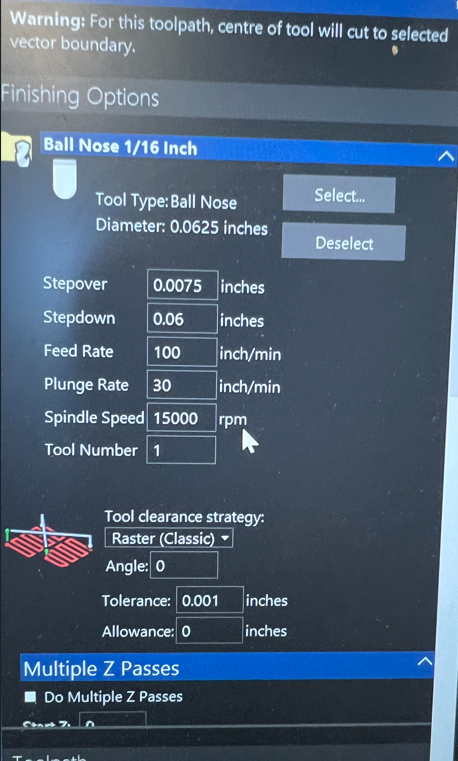
I am trying to make the sign shown below. I am importing a step file. That is all fine. But when I machine using a 1/4" end mill first and then a 1/16" tapered ball nose the result is shown below. The deepest the bit goes is 0.368" The wording for Lakehouse is very thin as you can see. Some parts of the letters have chipped away as shown. Is what I am trying to do an impossibility? Or is there a better method. Any suggestions would be great. There also is an image of my finishing milling setup.
Thank you for any thoughts.
Comments
Wood is one of those fantastic materials that you can do a lot with, but it does have its limitations one of which it will break easily when too thin, this is the way your work appears.
First and foremost I don't know which software or version you are using so I really can not direct you to do much but maybe get a different font or use the offset vector tool to enlarge the diameter of you thinnest font vectors, these would fix most of the thin, the other is not to use the tapered ball end, the reason for this is quite simply the bigger makes to top of you fonts smaller and more prone to chipping.
mike
Mike,
Thank you for the reply. I am using Carveco Maker. I can try offsetting the vectors. I also wondered about just doing pocketing routines versus 3d Relief carving. The pocketing would be done with an 1/8" end mill. Especially since there are no textured surfaces involved.
Thank You,
Chad
Here's the tool
mike
Please sign in to leave a comment.