curving vector around a curved line

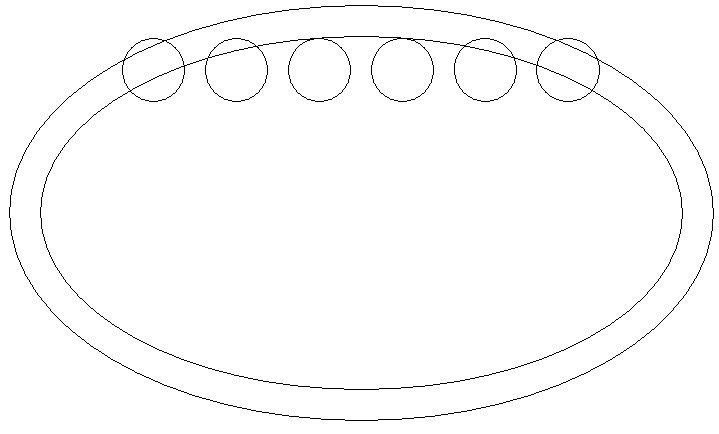
I am trying to bend the six circles around the inside of the second oval and the same at the bottom
After the six circles are in place top and bottom I want to delete the inner oval because it's purpose is for alignment only. I have checked for tutorials and searched found nothing. Any suggestions I have carveco maker
Comments
Hi Charlie,
Does Carveco Maker have this tool? Paste Along a Curve. If so, try it out, or I could explain what you need to do..
Elina.
Hi
You also just select and drag, make a disposible sq or circle to use for spacing
Bill
Got the circles OK
What I am trying to do now is put six ovals around another bigger oval
ovals are 2.0 wide and 1.5" high the oval I want to put them on is 14x7" ovals would be equally spaced at .5" apart
3 ovals on each side of the big oval center equally spaced at .5"
What I find so frustrating about this procedure is you have no choice to how many items you put on the curve it does it all the way around and you take what it gives you, which is stupid and another thing is it changes the sizes of the ovals to fit. and if you try and rotate an oval manually it resizes the oval, totally stupid
Normally you would do your column number, then the spacing, then the position top center or bottom and click you are done 30 sec.
If you can space these ovals out from the dimension's I gave you without anything being resized I would really like to know how
Charlie,
The way the tool work is it indexes from the center of the oval, it plops down the first one at the starting point then if you want a 1/2 inch from each other you'll have to figure out what the center measurement is to the other one, in this case you'll need to use 2.5 inches, the thing is you will have to figure out the length of curve you will need not the oval size, you can do this by making the oval you want then use node editing to get it to the size you'll need, if you use 1/4 of the oval you'll get 4, not 3 like you want.
Most of the stuff that we consider stupid really isn't, we just don't know how to do it or why things are done a certain way there is a very good reason why. Once we understand then designing becomes supper easy, it's like watching a 5 year old trying to learn how to ride a bike (kind of funny really, they've been walking for 4 years or so, how hard would it be to ride a bike.
mike
Mike
can you suggest a tutorial that will explain the process you are suggesting
Nothing I have found comes close to what you are talking about
If it is there I haven't found it so some direction is needed
Charlie,
This is such an easy tool to use, so I don't think there would be one.
I will walk you through, try to explain why
Most of what I have already said I'll say again.
If you want to use it effectively
You have to know it indexes from the center of the object. The first step
It starts at the start point (the green Node) of the curve in other words if want to copy a circle that's 1 inch in diameter the center of that circle is at .5" and it'll plop that first circle dead center of the start point of the curve.
You will find it beneficial to know if you try to copy 2 or more objects that are grouped together it may not do what you are asking, or what you expect to happen. There are ways to fix it after the fact. This is just for your information, but it'll usually do the center thing from the 2 or more objects..
If you need certain objects spaced correctly, find the measurement of the object first, write it down, then do your calculations, like I did with your 2 inch ovals, where you needed them a 1/2 inch apart I said you'd have to use 2.5 inches, there is a frustrating thing it does do, sometimes it doesn't pay attention to that if your curve isn't the right length, then you'll be using naughty words until you realize what the problem is ( the dang line is too long, or isn't long enough). You have to remember to tell the computer what you want in such a way that it can do it.
Okay I think my brain is running short of thoughts right now so if I have anything to add later I will, or maybe, it would be cool, to have someone else speak their view.
mike
Ok I see how it works so it won't be accurate to my settings because I have a complete oval
But knowing how it calculates now it was pretty easy to do
Thanks
https://learn.carveco.com/2d-design-vectors-and-bitmaps/paste-along-a-curve/
Charlie I was wrong there is a video of the paste on a curve, Leighton did another fantastic video, I guess I should look things up before I speak (or leap).
mike
Thanks
Please sign in to leave a comment.