Answered
Start node issue

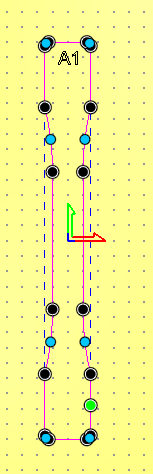
I am trying to machine a tensile test specimen where I first do a rough cut and then come back and cut a little off the surface to make it smooth. I am doing this by cutting out the part and then setting the Final Path Allowance to 0.005" as the last pass. The problem I am having is that the starting point for the FP is in the middle (neck region) of the specimen, which is the worst place to be. I moved the Start Node to the grip area so that the rough cut starts there but the FP starts at the neck. Why doesn't the FP also start at the green start node?
Comments
You do node editing HIGHLIGHT the node you want to be the starting node then hit "P" on your keyboard, make sure your mouse pointer is on the node, other wise it wont do squat.
mike
Hi, I have same problem. I try to move the starting point in the upper left side of my toolpath (see image) but the toolpath start at the wrong node. I can't move my toolpath starting point...
I am having the same issue. The question isn't how to move the start node, the question is why doesn't that move where the toolpath starts the carve.
John,
For me it's not been an issue, there is a location where people can ask for feature enhancements, there you can ask that a specific toolpath or maybe all toolpaths can be fixed to start at a specific location. I think it'd be cool to have that. (I must make a statement clear though, I do a lot of modeling (getting shapes) and every time I cut the shapes out the toolpath does start at the start node (green dots) only a few times with other toolpaths I can't remember which one at the moment start randomly). I have made a couple of requests in the past, for me the requests that I have asked for would speed up some of the modeling I do, so far there has been no change in the direction I have asked, but that's not saying there isn't a quick change that they could make for your desire.
I know that I really didn't answer James' question, and am sorry about that, I am a user just like you and answer to the best of my knowledge.
mike
Mike,
Thanks for the clarification, I see where for your carves it makes sense to move the start node. Apparently for area clearance using raster it picks a spot and I haven’t figured out how to change it. I’ve tried to change the start node and origin with no changes. The only way to make the carve easier on the bit is to use ramping moves.
I have a hard time focusing on what I think are small issues (sorry) the reason I say this is because every job that I do or have my router do, it come out with out any error. I just did 4 MFT tops that were all different I bored like 1200 holes did 10 area clearance toolpaths and different outside dimensions all 4 came out square the holes were 20 mm the depth of the area clear was .5 and all the slots were dead on, one set was 1.125" one was .75 one was 1.1 and the last one was 1", the only issue I had was I drilled into my spoil board a little too deep. I went to re-look at the designs and the start nodes the toolpaths all started on the green nodes every one.
I did 4 trees here 2 days ago with an .125 ball-end, it started right on the start node (my mistake) right in the center of the trees, had to stop the cutting and re-do the toolpath after I put the start node where it should have been (for me it's in the upper left) I didn't snap my bit because I caught it quickly (I was fortunate it would have cost me $40)
I wish sometimes people would make a suggestion (enhancement) people would make a suggestion in for that, I have made a couple, the reason is the way I model, the suggestions I have, the way I look at it is it would easy and speed up modeling a lot. I haven't seen them yet, probably because they would have to rewrite the complete software or make it huge to where we would have issues. In my view this software has so much going for it it's crazy.
I do encourage anyone who thinks something could be better please make the suggestion, I am happier than a lark with this software, my imagination just goes nuts with it, Ive done a Pegasus here recently and was having some fun with it with a niece of mine, a comment was on seagulls and the damage that they can make on your cars paint well that lead to more insane comments and we had a good time, so I did a couple models of bulls with wings too (you know a bull can weigh up to 2500 pounds).
well enjoy this stuff, and your day.
mike
Please sign in to leave a comment.