Preview Feature: Open PDF with Layers

In the Carveco 1.14 release, we've added our fourth Preview Feature.
Open PDF with Layers
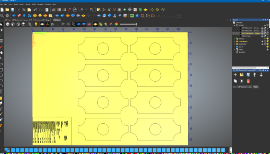
Create a model by opening a PDF file, where its crop box is used to set the model's dimensions, and all bitmap and vector artwork on each of its pages is automatically assigned to their own respective layers within the model.
This is useful when using PDFs as the basis for transferring work or for importing artwork from multiple page PDFs.
Follow these steps to try it out!
-
From the Start page, select Open.
-
Browse and select a PDF file using the Open dialog, then click Open. A new model is created from the PDF file including separate vector and bitmap layers in the Project tree containing the artwork extracted from each of the pages within the PDF file.
Please let us know if you find this feature useful, if you have any suggestions on how we can improve it, or if you encounter any issues while using it.
Comments
Please sign in to leave a comment.