Answered
Increase export resolution of triangular meshes?

Hi all,
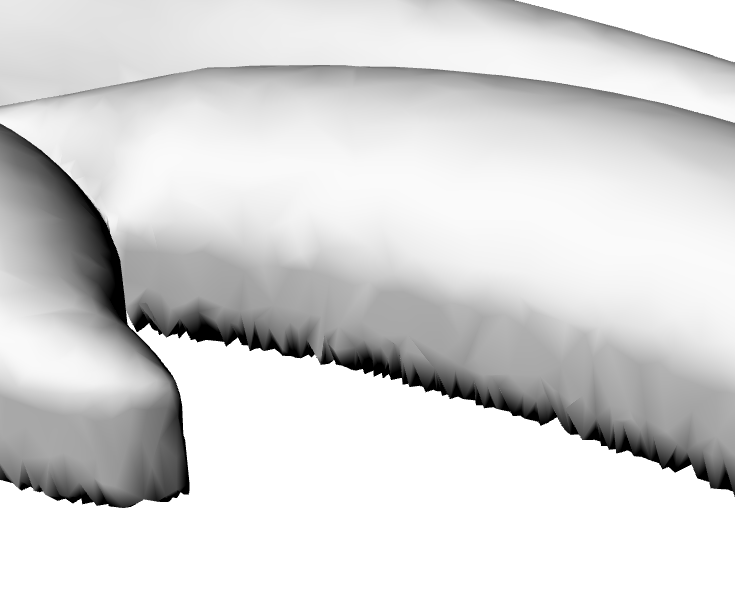
I'm wondering how can I increase the resolution of my exported reliefs. Here's what I've done so far:
1- created a new model with the appropriate work area in mm and moved the slider to have max resolution.
2- imported my vectors and created a relief.
3- under "relief --> export --> create triangle mesh", I'm using "close with a flat plane" and set the tolerance at 0.0001mm. Triangulation method is set to "optimize triangles".
4- I'm saving as an OBJ file and importing into Rhino. The resolution of the model is really low.
Suggestions?
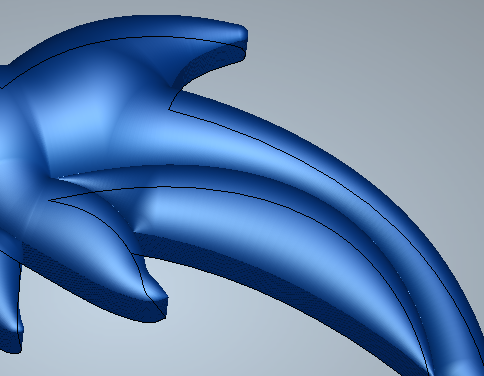
(grey model is the low output quality when imported into Rhino, the blue is the mesh in Carveco).
Comments
I found the issue. I'll post here for future reference.
The problem was caused during the "save" step when selecting the OBJ file format, you have two options in the bottom left of the pop-up box and mine was set at Quadrangle Mesh instead of Triangle Mesh. I repeated this process like 20 times and I kept missing these options!
Hey Robert,
FYI - I usually export in STL Binary format simply because it is the best bang for the buck in terms of size on disk vs quality. I have not found an OBJ to be advantageous, other than other software I/O compatibility over the STL Binary format. In fact, in almost all cases I have discovered that OBJ as triangle or quad mesh is nearly always substantially larger than a Binary STL with absolutely no difference in detail or quality.
Just for the heck of it, I exported a relief fragment using each option. I then imported them into Rhino5 for a comparison. I think there is some issue with exporting a quad OBJ out of CarveCo for one reason or another because it took like 15 minutes to spit out a very horrible low resolution OBJ. All others were pretty quick.
In my test, all were exported at 0.0001" error clamping/resolution in a 24x24" model @4000 x 4000 voxels. In the Rhino screenshot, the Quad OBJ is top left, Triangular OBJ bottom left. ASCII STL top right and Binary STL bottom right. Note the sizes of each file. Many programs, including Rhino get bogged down if meshes are too large on disk...in fact, many of the mesh tools in Rhino won't even work if the mesh is too fine (boolean ops etc).
I'm only posting in case you or others find these 'factoids' helpful...
Hi Brady,
I appreciate the info! I'm still using OBJ mostly out of habit. The reason I started using OBJ was because certain rendering engines preferred OBJ over STL. You would see artifacts in the render using the same export resolution. The only difference was the file format.
I also import meshes into 3D-Coat for the final touch ups. I'm sure importing an STL would work as well but again, I'm a creature of habit. The file ends up as an STL though since all my work is being 3D printed. I never compared the difference between ASCII and Binary meshes so that info is invaluable. Thanks again!
-Robert
Robert,
That makes sense. That probably explains why I often blow up 3DC trying to import an STL...Zbrush however, no problem. I don't really do much with rendering - most of my focus is on the geometry itself and how accurately it represents the original physical object (3D scanning).
In my experience with other software like 3DC/ZB etc, they don't like the low triangle count of the flat plane on the back side. If you intend to do any sculpting in those programs, just output the model with an inverted front so you have enough triangles not to cause weird things when sculpting in the other programs. Then just slice off the back with a plane when done.
I'm curious now about how CarveCo handles exporting quad mesh OBJs, because I do get requests for that format from some customers. Gonna do some more tinkering...
Please sign in to leave a comment.