Answered
I need some help on how to machine the area around an object

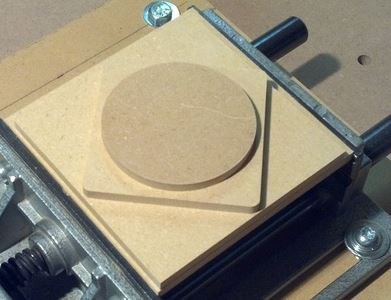
I am new user of Carveco and CNC in general. I am trying to machine out of a solid piece of material a circle on top of a diamond that is on top of a square (see attached sample image). The purpose of this is to check the axis calibration of my machine. I have created the 3 vectors but now how do I create the tool paths. My material is 20mm thick and I want the circle 6 mm thick and the diamond to be 6 mm thick and the square to be 6 mm thick. This should leave 2 mm at the bottom.
Any guidance would be appreciated.
Comments
I'm a newbe to but I think I would do it with 2 tool paths. One to cut the bottom square and the other to cut the top square, Just adjust the depth in the final Z setting for each tool path.
Hi Terry,
If you haven't done so already, please complete the Carveco Fundamentals training course here. This course includes demonstration videos which provide guidance on how to create and save toolpaths when working in Carveco Maker.
Thanks for your time and consideration.
Please sign in to leave a comment.